


Single Sign-On (SSO) lets Appspace authenticate users through a SAML 2.0 identity provider. This article is for IT administrators planning SSO for Appspace Cloud or on-prem. After reading, you will understand how SSO relates to JIT and SCIM, which provider options Appspace supports, and where to find configuration steps.
For: IT Administrator — Identity and access admins planning SSO for Appspace
What’s in this article:
How It Works
SSO enables users to access Appspace and other enterprise applications with one set of login credentials managed by your identity provider (IdP). Appspace supports major identity providers that use SAML 2.0, including tools such as Okta and OneLogin.
When users sign in to Appspace with SSO, the IdP authenticates their credentials and sends a SAML 2.0 assertion to Appspace through the browser.
Appspace supports a primary and a secondary SSO identity provider. If you need additional SSO providers, contact Appspace Support.
SSO authenticates users. User provisioning is configured separately:
-
SSO — user authentication through your SAML IdP.
-
Just-in-Time (JIT) provisioning — optional user creation on first SSO sign-in based on a SAML assertion. Available for Appspace Cloud.
-
SCIM — optional ongoing user provisioning, profile updates, and de-provisioning. SCIM does not require SSO; users can authenticate with Appspace credentials or with SSO. See Configure SCIM User Provisioning with HRIS/IdP for Appspace Cloud.
Just-in-Time Provisioning
When a user already configured in an access management tool signs in to Appspace for the first time using SSO, JIT provisioning uses a SAML assertion to create the Appspace user account if it does not already exist. This removes the need to create user accounts separately in Appspace before first sign-in.
Pass-Through Authentication
Pass-through authentication is available for on-prem deployments. Users authenticated through SSO or LDAP can be created automatically in Appspace and assigned Basic IDs. They cannot access the Appspace console; they can only view channels assigned to them in the channel browser. Pass-through authentication is disabled by default on cloud.
Note: JIT creates users at sign-in and does not provide the same ongoing profile updates and de-provisioning capabilities as SCIM.
SSO Authentication Workflows
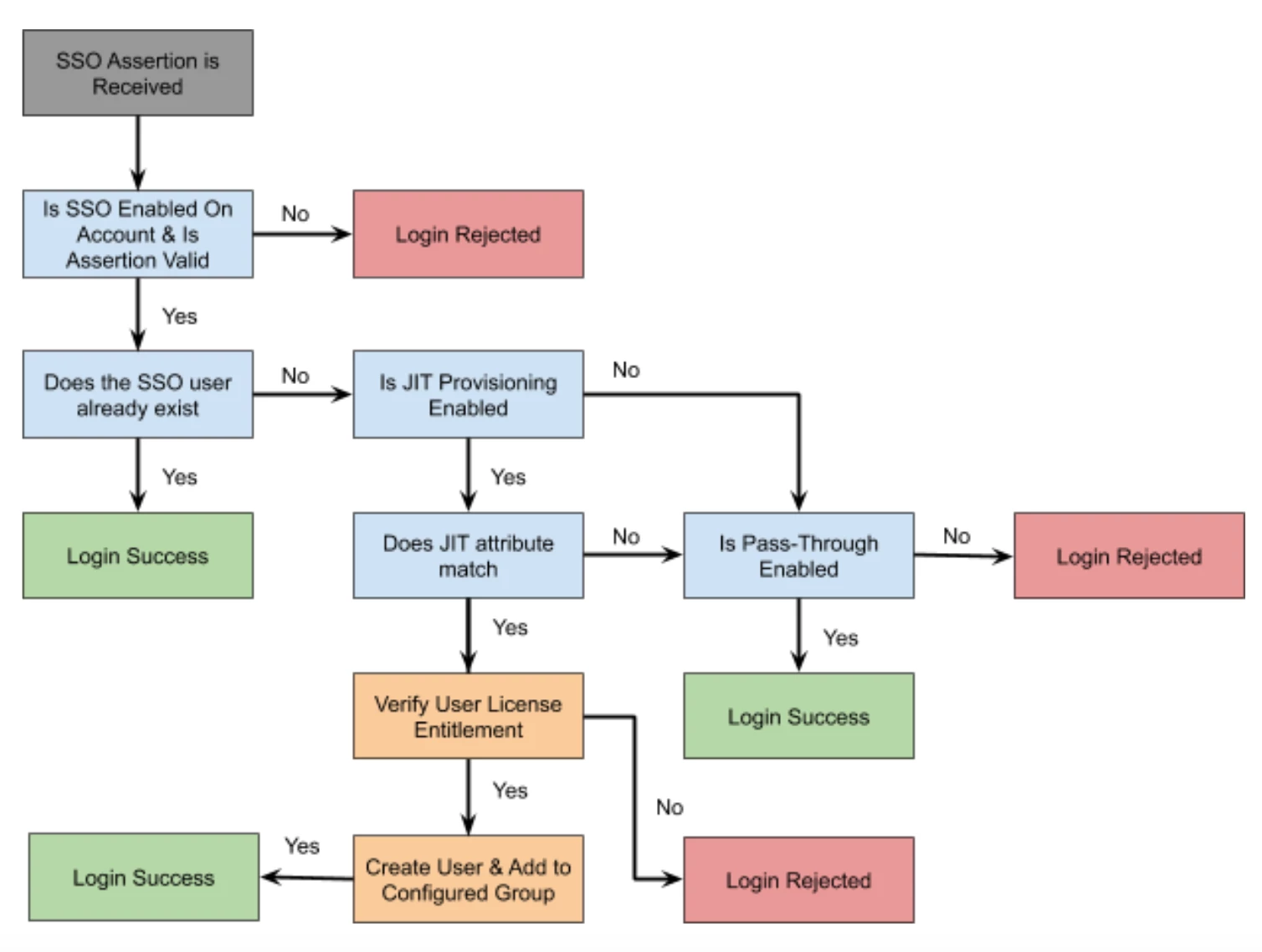
There are four SSO authentication scenarios for an Appspace account:
-
Only SSO is enabled. Neither JIT provisioning nor pass-through authentication is enabled.
-
SSO with JIT provisioning is enabled, but pass-through authentication is not enabled.
-
SSO with pass-through authentication is enabled, but JIT provisioning is not enabled.
-
SSO with both JIT provisioning and pass-through authentication is enabled.
The following diagram shows the SSO account authentication workflow:
Requirements
JIT Provisioning
-
An Identity Provider that is SAML 2.0 compliant.
-
IdP metadata, or the SSO URL and x.509 certificate.
-
Appspace account with Account Owner credentials to configure SSO settings.
-
An Appspace user group to act as the default user group for newly created JIT-provisioned users.
-
A SAML identification attribute flag configured in both the IdP and Appspace to identify users that should be created in Appspace.
-
IdP attribute mappings for fields such as First Name and Last Name.
-
JIT configured in your access management tool, with any Appspace-specific attributes passed in each assertion.
-
Appspace available in the IdP-specific app catalog, if required by your IdP.
Pass-Through Authentication
-
An Identity Provider that is SAML 2.0 compliant.
-
IdP metadata, or the SSO URL and x.509 certificate.
-
Appspace account with Account Owner credentials to configure SSO settings.