


What’s in this article:
Introduction
Appspace is a scalable, enterprise-grade, cloud-based SaaS (Software as a Service) platform, that enables organizations to centrally manage the publishing and distribution of content to thousands of endpoint devices. Appspace combines user-friendliness with powerful and robust features, enabling organizations to swiftly and securely deploy, manage, and control content of any kind from any location via a web browser.
Supporting multiple industry-leading devices and operating systems such as Chrome OS, Android, iOS, BrightSign, Cisco, Crestron, and many others, Appspace provides a wide range of possibilities for the following workplace solutions:
- Engage your employees by displaying the latest corporate announcements, sales wins, employee activities, awards, corporate videos, vision statements, and more through Digital Signage or via our Employee Communications solution.
- Engage your customers by exhibiting winning ads, corporate videos, movie posters, or menus tailored to your customers on multi-screen video walls or interactive displays.
- Utilize Space Reservations within the organization to display meeting room availability or provide hot-desking for employees, that may book directly from the designated meeting rooms through tablets, or QR Codes displayed on desks.
- Manage visitors or implement a hybrid working environment through our Visitor Management system, ensuring visitors pre-register for building access and check-ins through kiosks on-site while meeting the organization’s checkpoints and capacity requirements.
- Provide location-based touch screen self-service kiosk with directories and maps for Wayfinding.
While content is key, selecting the right device is equally vital in capturing a larger audience. The device’s responsibility lies in showcasing content seamlessly and reliably, ensuring the efficient delivery of information to your audience. By utilizing our user-friendly HTML5-based Appspace App, we may present responsive content with exceptional broadcast and picture quality.
In this article, we provide an overview of the commonly used devices within the industry that fulfill various content display requirements, along with essential information to consider before purchasing or configuring them. We shall also cover devices that have been tested by Appspace, and devices that are compatible or that have been self-certified by partner device companies. With this information, we hope in assisting you make a well-informed decision by selecting the right device for your business requirements.
Understanding Devices in Appspace
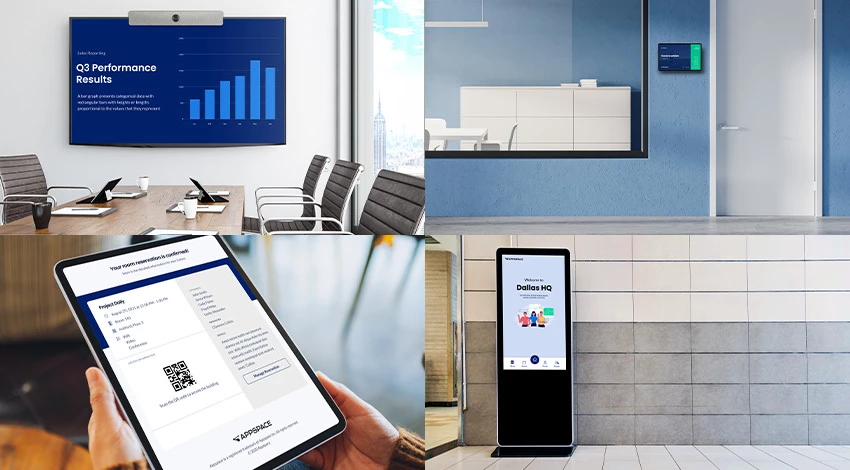
There are several different terminologies used throughout the industry to imply a device that fulfills similar functionality, such as a media player, mini-PC, set-top box, IPTV box, smart panels, tablets, etc. They all essentially serve the same purpose, as a device that retrieves digital content (image, audio/video, live streams) from a content management platform, and display it on digital screens, such as TVs, video walls, kiosks, or handheld devices such as tablets and other mobile devices.
Here at Appspace, all these variations are commonly referred to as “devices“.
Definition of Supported Devices and Operating Systems
In today’s communication landscape, Digital Signage has become a fundamental component of most organizations, thus as the industry grows, the demand for certified device hardware and operating systems continues to increase. To ensure seamless operation and to achieve desired results, Digital Signage networks rely on reliable and sturdy hardware running stable operating systems. In order to meet these requirements, Appspace has introduced multiple levels of technical certification for its devices as stated below, that not only support Digital Signage, but also Space Reservations and Visitor Management.
Appspace certification levels for Devices and Operating Systems:
- Appspace Certified: Built-in
- Appspace Certified: App for Devices
- Appspace Compatible
Appspace Certified: Built-In
Appspace Built-In represents the pinnacle of hardware partnership. These devices incorporate the Appspace App directly into the device firmware or operating system.
-
Experience: Provides a true "out-of-the-box" solution with zero-touch deployment capabilities.
-
Performance: Delivers the highest level of stability and performance, optimized specifically for that hardware's architecture.
-
Support: Full, end-to-end support from both Appspace and the hardware manufacturer.
See our Supported Devices — Appspace Certified: App Built-In article.
Appspace Certified: App for Devices
Appspace Certified hardware is the recommended choice for customers seeking reliable, high-performance solutions via a downloadable application.
-
Validation: Certification is conducted at the OS or firmware level using a specific reference model. This ensures that similar models from the same partner sharing that OS are highly compatible.
-
Integration: These devices are extensively tested by Appspace labs to ensure seamless integration with our latest features and management tools.
-
Support: Appspace maintains these devices in-house for troubleshooting and rapid bug resolution.
See our Supported Devices — Appspace Certified: App for Devices article.
Appspace Compatible
The Appspace Compatible designation is the foundational tier of our hardware program, now encompassing both general device compatibility and Partner Self-Certified solutions. This category identifies hardware that meets the essential technical requirements to run the Appspace App on approved operating systems.
Devices in this tier provide a reliable baseline for digital signage and workplace communications, ensuring your content reaches the screen without the need for exhaustive internal Appspace labs testing.
Support and Functionality
-
Performance: While these devices offer fundamental functionality, some advanced features—such as multi-zone content, IPTV, or hardware-specific triggers (LED control, occupancy sensors)—may vary by model.
-
Validation: For Self-Certified devices, hardware partners have completed a rigorous battery of Appspace-defined test scenarios to ensure the device meets our standards for quality and performance.
-
Support Model: Support is provided through a mutual agreement with our hardware partners. Partners take the lead on troubleshooting and application-level support, as they maintain the specific hardware units for testing.
-
Firmware Currency: Appspace supports these devices as long as the OS/firmware is within one major version of the latest certified release. If an issue arises on outdated firmware, validation will be required on the most current version.
Selection Guidance
If the Appspace App for Devices is available in your device’s app store, it is likely viable for use. However, for specialized use cases like room booking or advanced sensor integration, we recommend verifying specific model capabilities.
For a list of Appspace Compatible devices, visit our Supported Devices — Appspace Compatible article.
Definition of Appspace Apps
Appspace App for Devices
The Appspace App for Devices supports a multitude of industry-leading device platforms and operating systems such as Chrome OS, Android, iOS, BrightSign, Cisco, Crestron, etc, that meet different business requirements including playback performance, physical dimensions, hardware features, content delivery modes (streaming or caching), and general workplace experiences.
Designed primarily for the workspace experience, the Appspace App for Devices is ideal for the following solutions:
- Digital signage on single or multiple display screens, video walls, and media players.
- Room scheduling on tablets, desk pucks, or interactive display panels.
- Interactive touch-screen kiosks for visitor invitations, wayfinding, and employee directories.
- Enterprise TVs for displaying channels and live streams on system-on-chip (SOC) TVs.
Most of these industry-leading devices come with internal storage, allowing content from Appspace to be cached.
Appspace App Built-In
Appspace App Built-in is when Appspace hardware partners incorporate the Appspace App directly into their firmware or devices, providing an out-of-the-box solution by leveraging existing workplace devices and systems that may have specialized dedicated functions (i.e video conferencing). As it comes pre-built into these devices, the Appspace App functionality may be limited to only certain features, such as:
- Basic wallpaper or signage displays using Appspace on room conferencing devices that are idle.
- Basic wallpaper or signage displays using Appspace Lite, on the vendor’s device management portal.
- Room scheduling with Appspace cards on purpose-built room scheduling devices or smart signboards.
Content from Appspace is usually streamed on these devices, and not stored locally due to functional limitations on the device.
Support Strategy for Certified and Built-In Devices
Appspace is committed to providing reliable support for integrated technology platforms used by their Apps – Appspace for Employees and Appspace for Devices. This document outlines Appspace’s certification logic and planning, which is based on Semantic Versioning (MAJOR.MINOR.PATCH), and how they handle deprecation and updates.
Supported Technologies and Platforms
Appspace supports a range of technologies and platforms, and certifications will be based on Generally Available releases as a rule. Appspace will not officially certify pre-release, alpha, beta, or other custom builds of firmware/OS until they are released publicly by a technology partner. For all certifications, Appspace will target the current and current -1 major versions assuming the prior version is still supported by the manufacturer.
Certification Logic and Planning
Certifications will be based on major.minor versions and patch recertification will not be done as a rule but should be considered compatible. Minor version changes will also be supported as new releases become available and shall be treated as compatible. Certifications may explicitly change to a major.minor version due to an unforeseen breaking change or requirement to support a new feature provided by the partner.
Updates and Deprecation
For every new major version certified, the oldest previously certified version shall be deprecated from support. This deprecation will be announced in conjunction with the announcement of support for the new version. Although the recommended version will be within the N-1 model, other versions within the specified range will still be supported.
However, fixes to a discovered issue will be based on the N-1 model and will only be implemented through a release of the latest version of the Appspace App and may require an update to the device’s OS/firmware.
Support Policy
Important
- In order to ensure optimal performance, security, and compatibility with Appspace’s latest features, please review our Appspace Device App version support policy.
Appspace’s support policy for devices will follow a model of offering full support to devices running a certified version of the most up-to-date OS/firmware that a particular device can run. This full support will cover the current major firmware version as well as the previous major release. For example, if firmware 3.0 is the latest, versions 2.0 to 3.0 will be offered full support. If any bugs or issues are found within this range, Appspace will provide fixes for the version that was initially tested.
Devices running on OS/firmware that fall outside of this major release range will not be eliminated from Appspace support entirely, but they will be offered limited support at the discretion of Appspace. Any reported issues that occur on devices outside of this certified range will be investigated by Appspace, but any validation, testing, and fixes will be implemented on the OS/firmware within the certified range and at the discretion of Appspace. Devices that will still be offered limited support can be found on the deprecating devices page.
The minimum certified OS/firmware will automatically change when a new major release is certified by Appspace. The supported devices page will only include devices within the certified, full support range. Compatible devices will be listed on the same page as certified devices but in a separate section.
Selecting the Right Device
When it comes to Appspace App for Devices or Appspace App Built-in, the optimal specifications for an industry-standard device will depend on the type of content you wish to display, the number of different channels you wish to run, and the scale of your deployment. While we make playing content on your screens simple, there are so many options for devices, that it can sometimes be hard to find the right one. Here are some factors that should be considered prior to selecting a device:
- Function & Compatibility: The Appspace App runs on a wide variety of devices, each of which has different strengths. To ensure a device is compatible with Appspace and is appropriate for your application, it is important to take a holistic view. It is worth taking into account the content variety (streaming, video, static), amount of content, type of messaging that will be displayed on the screen, for which purpose (signage/kiosk/room scheduling), and the display layout (single/multi-screen) as well.
- Performance & Reliability: A device’s processing power will determine the dynamic nature of the content you will be able to display on your screen. Basic-powered devices are ideal for operating restaurant menu boards, information boards, directories, catalogs, etc., while medium devices with greater processing power are required to play videos or display them on multiple screens. Higher-end devices are necessary to display HD videos, animated graphics, operate a video wall, stream live web feeds, and play various interactive videos in multiple places. Also, ensure the device has sufficient storage to store content locally. Finally, take into consideration if the device needs to run 24/7 and the harshness of the environment (indoors, outdoors, room temperatures, dust, etc). Glitches during playback or slow-performing devices can ruin the viewing experience so it is vital that a sufficient device is selected.
- Device Management: It is common to have devices distributed across networks in multiple buildings, cities, and even countries. Thus it is necessary to consider the following factors for device management such as:
- Can you access the device remotely?
- Can you push content to devices in bulk?
- Can you turn the screens on or off?
- How do you perform maintenance, system upgrade, or update the device firmware?
- Integrated Screen: There are two primary scenarios for devices integrated with a screen: smart TVs and tablets. Smart TVs have a device built into them. This eliminates extra cabling and the installation of a separate device, but the built-in devices are generally less powerful than a standalone device. And a failure of either TV or device means the replacement of both units, whereas a separate TV and device allow for separate maintenance or upgrade of each. Tablets are most often used as room schedule signs and installed just outside the door of a conference room.
- Budget & Cost: Gauge how many devices you may need, and what the budget is like. Devices range in technical specifications depending on cost.
Conclusion
When you choose Appspace as your digital signage software provider, content management becomes a hassle-free task. Your primary focus then shifts to selecting the best device for your business requirements. Appspace supports a diverse range of devices and operating systems, offering extensive options for showcasing remarkable content.
However, it’s important to note that each customer’s content presentation, goals, network bandwidth, and environment are unique. Therefore, it is crucial to plan your digital signage requirements, objectives, and budget before making an investment in a device. This thoughtful planning process ensures that you make the right choice to meet your specific needs. Thus, select a device based on its hardware specifications, prioritizing the factors that are most important to you.
If you’re still unsure about selecting the best device for your requirements, don’t hesitate to reach out to your Customer Success Manager for guidance, as we are here to assist and provide you with advice in selecting the most suitable device. Additionally, we can collaborate with the recommended hardware vendor(s) to arrange demonstrations and ensure that the final solution aligns with your objectives.