



Choose the Right Intranet Space: A Guide to the Six Default Templates
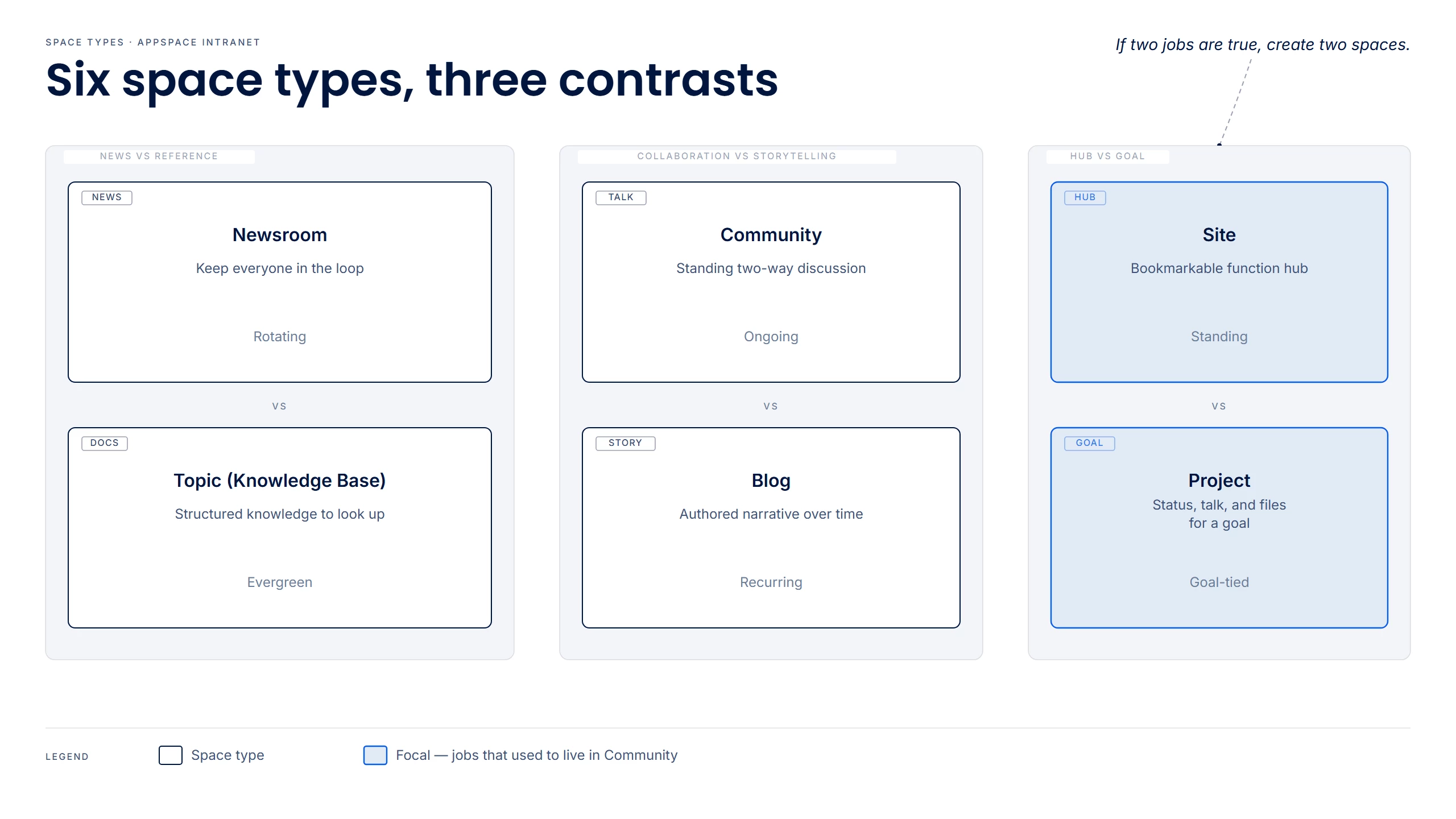
Spaces are where intranet content lives in Appspace, and a new space can start from a template built for the job it has to do. Appspace includes six default templates: Newsroom, Topic, Community, Blog, Site, and Project. Together they cover timely news, lasting reference, standing groups, leadership voices, department homes, and shared goals. Each template belongs to a space type of the same name, which is the category Account Owners use to control which templates people can pick.
This guide is for publishers, space owners, communications teams, and Account Owners who decide how intranet content is organized. When the template matches the job, the space opens with sections and publishing already set, and employees know where to go for each kind of content. One program can use several templates, and the categories you don't need can be hidden.
Key Benefits
- Start from the job — News, reference, a standing group, a leadership column, a department home, and a shared goal each open from a default template, with sections and publishing already set.
- Make the destination obvious — People learn where to look for what is happening now, what to look up, where a group talks, and where a team or goal lives.
- Use several templates for one program — A launch, an HR program, or a department can have news, a handbook, a discussion space, a hub, and a project space.
- Hide a category you will not use — An Account Owner turns that space type off, and its template leaves the picker.
What This Guide Covers
- The six default templates and the job each one fits
- Space type as the category behind each template
- A flowchart that picks a template
- Where to check that a space type is turned on
- What a new space inherits from the template
- One program that uses every template
- Common mix-ups
Prerequisites
- To review categories, you must be an Account Owner with a Platform license. Publishers with a Platform license can create spaces when that permission is turned on in Spaces settings.
- A content job in mind: news, reference, collaboration, a leadership story, a department home, or a shared goal.
Steps
1. Determine the job
Name the job before you name the space. The six templates split into three pairs that are easy to confuse.
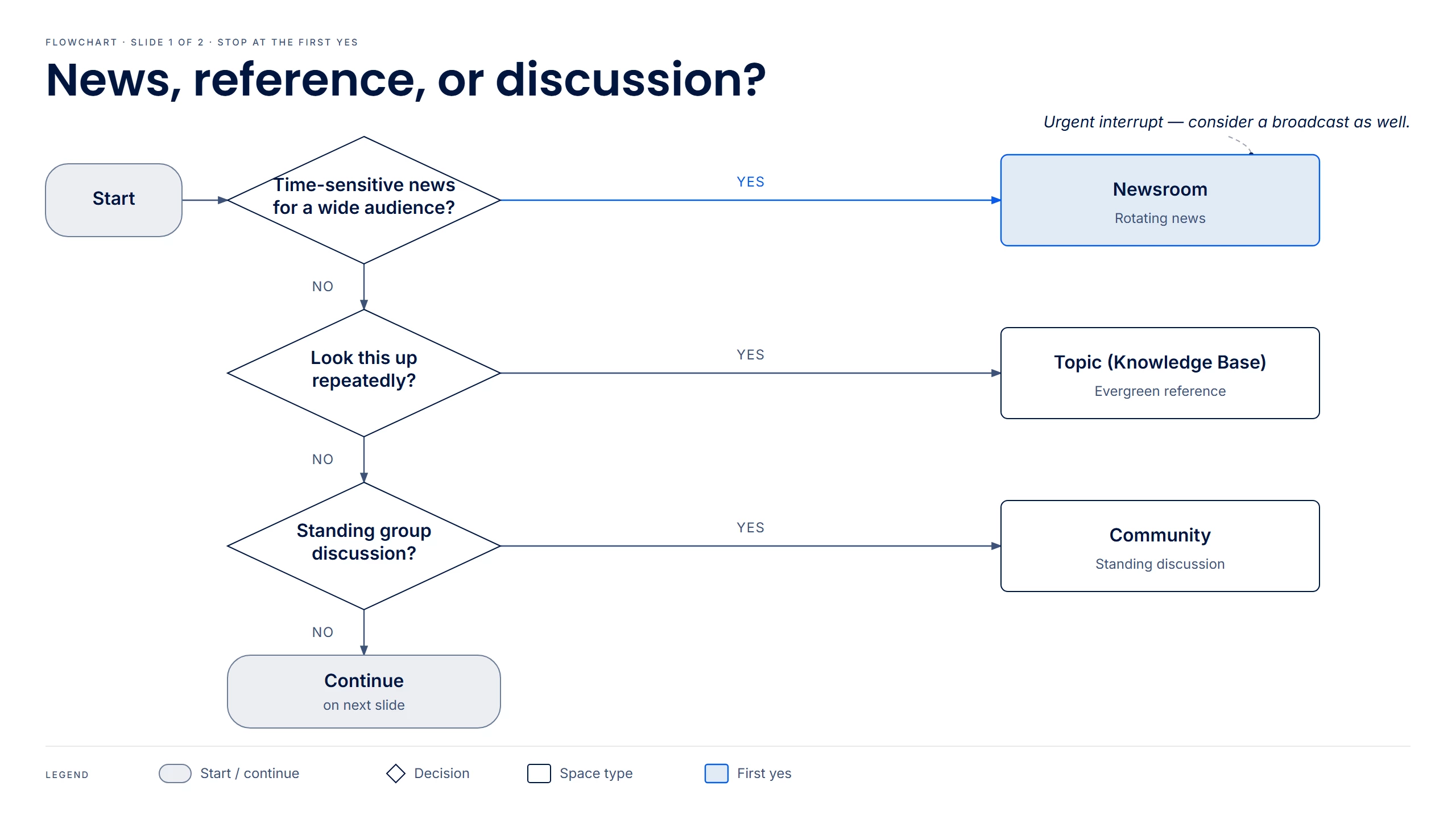
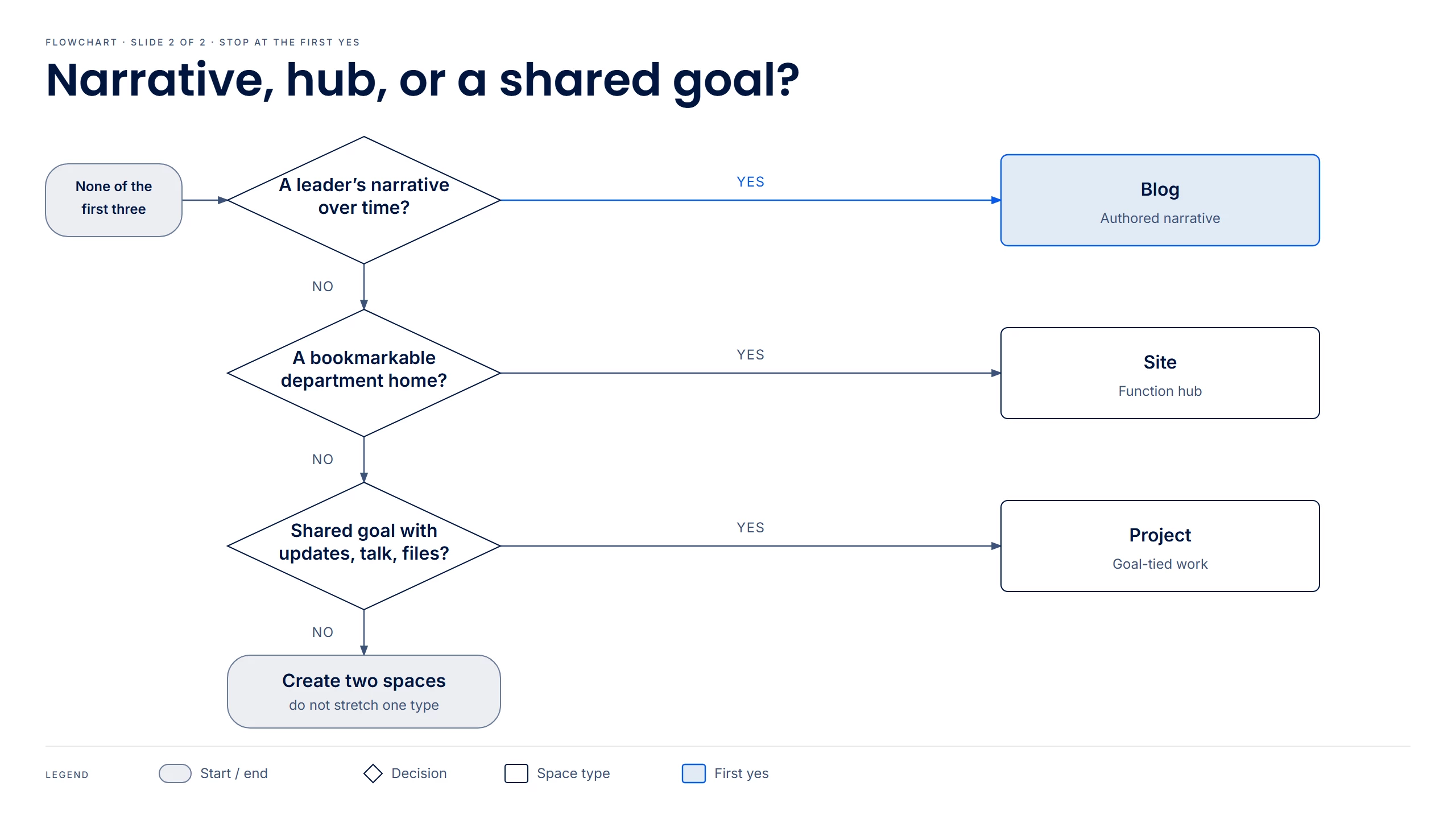
To pick one template, answer the questions in order and stop at the first yes.
| Template | Typical uses |
|---|---|
| Newsroom | Company news, regional office updates, executive communications |
| Topic | Team handbook, IT help desk, onboarding center, brand or product knowledge |
| Community | Team room, social clubs, recognition center, virtual town hall |
| Blog | CEO blog, employee spotlight, thought leadership series |
| Site | Finance and legal, people and culture, an office location, request center |
| Project | Product launch, office relocation, annual planning, deal room |
If you already used Channels, Topics, or Communities
| Older place | Template | What to do now |
|---|---|---|
| Channels (intranet news) | Newsroom | Put rotating intranet news in a Newsroom. Keep a Channel when that news also publishes to digital signage. |
| Topics | Topic | Upgrade the Topic when it should live as a Space. |
| Communities | Community | Upgrade the Community when it should live as a Space. Put a department home on a Site and a shared goal on a Project. |
| A narrative series | Blog | Use a Blog when the author's voice is the point. |
2. Open Space Types settings
As an Account Owner, go to Spaces > Settings > Space Types. Publishers skip to step 3.
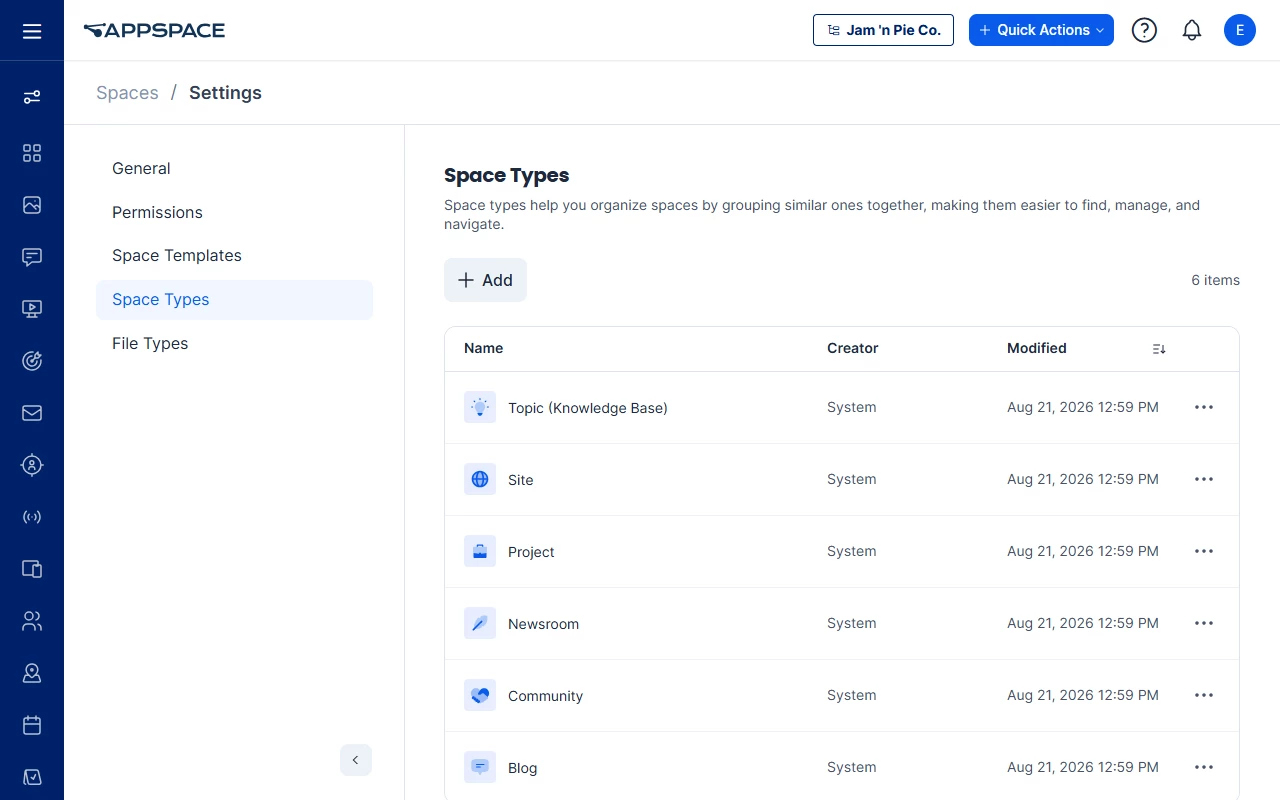
Find the space type for your job. Topic is listed as Topic (Knowledge Base). If the type is turned off, turn it back on so its template appears on Create Space.
When none of the six categories cover the job, add a custom space type here, then attach a template to it.
3. Pick the template on Create Space
On Create Space, select the template for your job. Search templates when the list is long. Blank Space starts without a template.
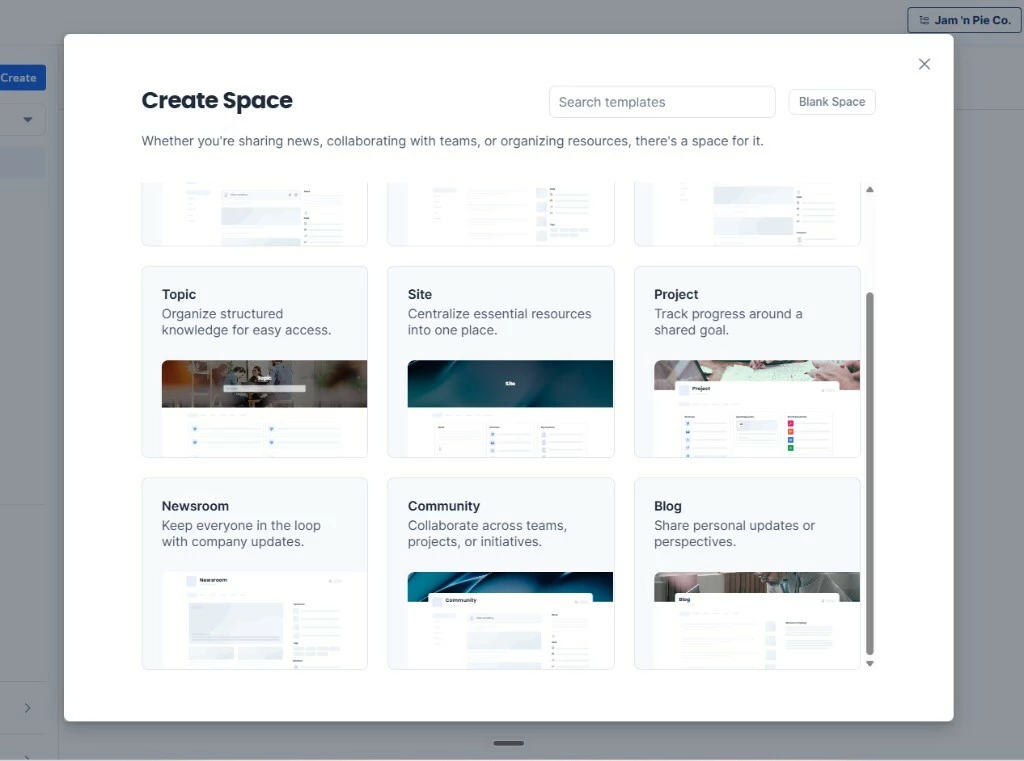
The Community card mentions projects and initiatives. Use Community for a standing group. Use Project when the space exists because of a shared goal.
4. Expect the template's starting setup
All six default templates start as Public with Opt-In following. The new space inherits that template's sections, widgets, and the publishing defaults below. Change them on the space after you create it.
| Template | Anyone can add | Owners only | Off |
|---|---|---|---|
| Newsroom | Posts, Events, Praises, Polls, Questions | Newsletters, Pages, Stories | — |
| Topic | — | Pages, Stories | Posts, Events, Newsletters, Praises, Polls, Questions |
| Community | Posts, Events, Praises, Polls, Questions | Newsletters, Pages, Stories | — |
| Blog | — | Stories | Posts, Events, Newsletters, Praises, Polls, Questions, Pages |
| Site | Posts, Events, Praises, Polls, Questions | Newsletters, Pages, Stories | — |
| Project | Posts, Events, Praises, Polls, Questions | Newsletters, Pages, Stories | — |
When none of the six fit, an Account Owner can create a custom template and attach it to a built-in or custom space type.
Use Case
Scenario: A manufacturing company is rolling out a year-long safety program.
Communications, EHS, and plant leadership split the program by job:
| Job | Template |
|---|---|
| Company-wide announcements | Newsroom |
| Lasting procedures | Topic |
| The standing EHS practice group | Community |
| The plant manager's column | Blog |
| The EHS home page | Site |
| FY26 Safety Certification | Project |
People hear about the program in the Newsroom, look up the rules in the Topic, talk in the Community, follow the column on the Blog, and start from the Site. The certification team works in the Project. When the certification ends, that Project stays as the archive. The Topic and the Site stay in use.
Best Practices
- Pick the template from the job, then name the space. "HR," "Safety," or "Launch" can be a Site, a Community, a Project, or all three.
- Keep rotating news on Newsroom and the lasting document on Topic. Announce a policy change from the Newsroom. Keep the policy itself on the Topic.
- Keep a recognizable voice on Blog. A leadership column and the company newsreel are two spaces.
- Agree the templates before anyone clicks Create. Account Owners, Publishers, and communications name which templates a program will use.
Troubleshoot
| Symptom | Likely cause | What to try |
|---|---|---|
| Policies disappear under yesterday's headlines | The Newsroom is holding the handbook | Move evergreen material to a Topic. Keep rotating announcements in the Newsroom. |
| A leader space is a stream of one-way posts | A Community is holding a column | Use a Blog for the narrative. Use Newsroom for company-wide news. Add a Community when you want a standing discussion group. |
| A department Community is pages and links, and almost nobody posts | The Community is acting as the department home | Use a Site as the hub. Keep a Community for questions and peer posts. |
| A standing interest group sits in a space named for a dated initiative | A Project is holding an ongoing group | Use a Community. Reserve Project for a shared goal. |
| Status, files, and chatter for one goal are scattered across a large Community | The Community is acting as the project room | Create a Project for that goal. Leave the Community for the ongoing group. |
| You still see Topics, Communities, or Channels | Upgrade is per Topic and per Community. Channels stay for publishing | Upgrade the Topic or Community that should live as a Space. Keep Channels for publishing and digital signage. |
| A template is missing from Create Space | An Account Owner turned that space type off | Ask an Account Owner to open Spaces > Settings > Space Types and turn the type back on. |
Related
- Know Your Spaces: A Breakdown of Channels, Topics & Communities — Channels, Topics, and Communities
- Customize New Types of Spaces in Appspace Intranet: A Guide to Creating and Managing Space Templates — template library, custom space types, and creating a space from a template
- Manage Page and Story Templates — templates for Pages and Stories inside a space
- Create and Manage Pages
- Create and Manage Stories
- Appspace Intranet User Roles