



This document provides guidelines for troubleshooting when an event shows a "Canceled" status in Appspace.
In Appspace, several scenarios can cause an event's status to change to "Canceled." Below are the possible scenarios that may result in an event being canceled:
-
Event Schedule Conflict
-
Schedule: The event overlaps with another scheduled event.
-
Constraint Rule: The event violates resource constraint rules.
-
Depends on the reservation settings configured in the customer environment.
-
See: Configure Reservation Settings article.
-
-
Check-In Requirements
-
The auto-cancel action is triggered if the user fails to check in within the check-in window.
-
The auto-cancel for check-in expiration only happens when the timeout action is configured to auto-cancel in the check-in rule.
-

-
Checkpoint Failure
-
The attendee or organizer fails to complete the checkpoint.
-
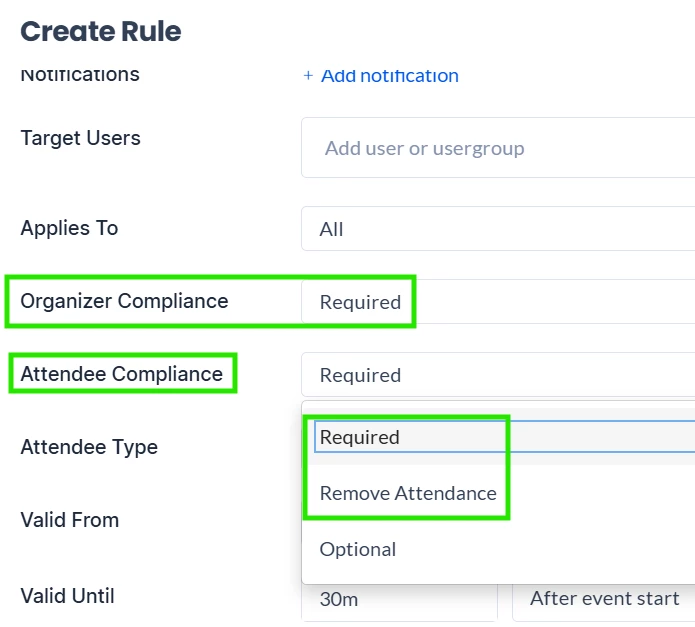
This depends on the compliance type that is set for the attendee and the organizer.
-
For the organizer:
-
Required: Will cancel the event if the organizer fails to complete the checkpoint.
-
-
For the attendee:
-
Required:
-
If the attendee has accepted the invite but does not complete the checkpoint, the event will be canceled.
-
If the attendee has not yet accepted the invite and does not complete the checkpoint, the attendee will be removed from the event.
-
-
Remove Attendance: Will remove the attendee from the event if the attendee fails to complete the checkpoint.
-
If no attendees are involved in the event anymore, the event will be canceled as well.
-
-
-
-
User Action
-
The user manually cancels the event.
-
-
Approval Workflow
-
The event requires approval, but:
-
The approver declines the event.
-
The approver fails to approve the event before the event starts.
-
-
How to Troubleshoot a Canceled Event in Appspace
To investigate why an event was canceled:
-
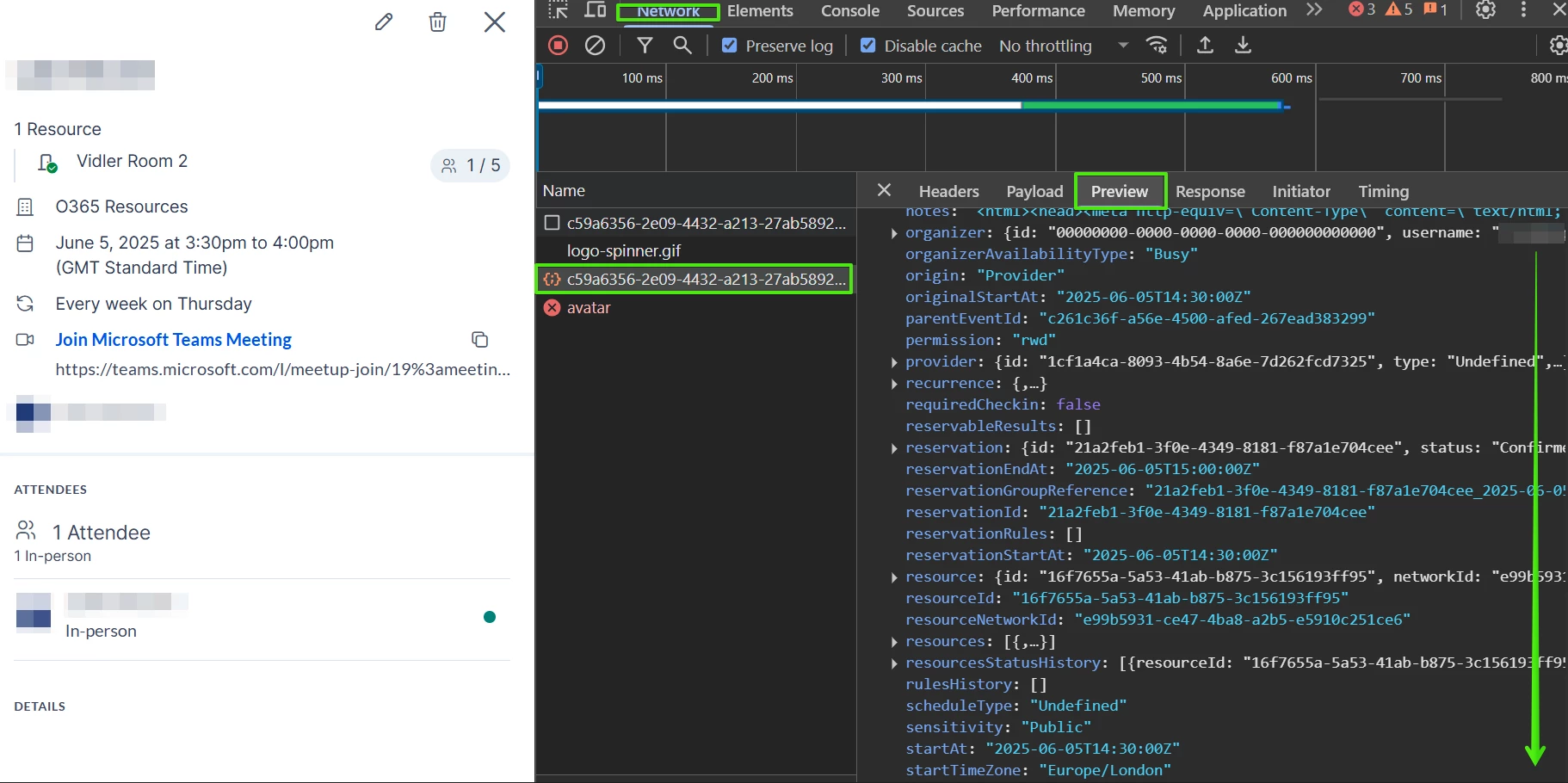
Access the Event Data
-
Open the developer tools in your browser.
-
Navigate to the Network tab.
-
Select the event within the Appspace.
-
-
Locate the Relevant Request
-
Look for a GET request with a URL similar to this:
-
9c024b2c-5c1a-4f26-8db6-bf58e700a055?includesourceobject=true
-
Alternatively, search for "reservation/event" in the Network tab to filter and locate the request more easily.
-
-
Inspect the Request Details
-
Click on the request and check the Preview or Response tab.
-
-
Review the Relevant Fields
-
statusHistoryField:-
This field contains the cancellation history, including the reason and the
updatedAttimestamp. -
If the event was canceled due to a conflict, this field should also include conflict history.
-
Refer to below example under Example of event canceled due to conflict.
-
-
reservableResultsField:-
This field records the conflict reason if the event was canceled due to a conflict.
-
Refer to: [How to check Provider Event Conflict Reason].
-
-
Example of an event canceled due to conflict:
-
reservableResultsindicates the reason for the conflict and the constraint rule. -
statusHistoryshows the event first in a "conflict" status, followed by a "canceled" status.
"reservableResults": [
{
"resourceId": "9c564249-0c32-440f-a42f-2d5e9b7d549f",
"resourceName": "Room3",
"reservableStatus": "Unavailable",
"events": [],
"constraintValidationResult": {
"errors": [
{
"message": "Min reservation booking period is 15 minute(s).",
"reservationRule": {
"id": "7ab67948-a477-423b-94f8-f1099091b9bc",
"category": "Constraint",
"type": "MinReservationDuration",
"resourceTypes": [],
"value": {
"minutes": 15
},
"targets": [],
"validToOption": "BeforeEventStart",
"validFromOption": "BeforeEventStart",
"triggers": [],
"position": 1,
"checkpointBannerType": "Undefined"
}
}
]
},
"unavailableReason": "Constraint"
}
],
"statusHistory": [
{
"status": "Conflict",
"updatedAt": "2025-01-24T07:28:54.637Z",
"reason": "SystemAction"
},
{
"status": "Canceled",
"updatedAt": "2025-01-24T07:28:54.649Z",
"reason": "SystemAction"
}
],
Example of an event canceled due to an expired check-in:
-
statusHistoryshows the event first in the "Checkin" status, followed by a "canceled" status.
"statusHistory": [
{
"status": "Checkin",
"updatedAt": "2025-01-24T08:17:00.024Z",
"reason": "SystemAction"
},
{
"status": "Canceled",
"updatedAt": "2025-01-24T08:19:01.279Z",
"reason": "CheckinExpired"
}
],
For an event canceled due to a declined approval:
In this case, the statusHistory field does not provide information to identify the reason. However, the ApprovalDeclined note will be shown in the statusReason that is located under the reservation field within the data from the developer tools.
"reservation": {
"id": "6d1f02b3-523d-475d-a5a7-4fa4bccf7b09",
"status": "Canceled",
"resources": [
{
"id": "fbdc57fc-5e8a-4b97-bbf0-b50297eb37cd",
"name": "Room6"
}
],
"organizer": {
"id": "6d4c0d94-c754-4f53-b572-a4d57d3d7f02",
"username": "xxx@appspacedev2.onmicrosoft.com",
"email": "xxx@appspacedev2.onmicrosoft.com",
"name": "Dev XXX",
"type": "User"
},
"title": "Test-ApprovalDecline",
"hasError": false,
"effectiveStartAt": "2025-01-24T08:30:00Z",
"effectiveEndAt": "2025-01-24T09:00:00Z",
"createdAt": "2025-01-24T08:19:13.374Z",
"updatedAt": "2025-01-24T08:22:45.892Z",
"attendees": [
{
"userId": "6d4c0d94-c754-4f53-b572-a4d57d3d7f02",
"email": "xxx@appspacedev2.onmicrosoft.com",
"displayName": "Dev XXX",
"status": "Accepted",
"attendanceId": "52a178e4-16a9-4440-a496-4ed9946f4ac3",
"userType": "User",
"attendanceType": "InPerson",
"resources": [
{
"resourceId": "fbdc57fc-5e8a-4b97-bbf0-b50297eb37cd"
}
],
"originType": 2
}
],
"checkpoints": [],
"completedCheckpoints": [
{
"completedAt": "2025-01-24T08:22:45.832Z",
"response": {
"status": "Failed",
"createdAt": "2025-01-24T08:22:45.831Z",
"createdByUser": "Admin",
"inputResponses": [
{
"type": "Text",
"valueType": "Undefined",
"name": "Notes",
"displayName": "Notes"
}
],
"customLabels": []
},
"id": "e96e145b-3b01-452a-87d7-05cb8a3d5232",
"resource": {
"id": "fbdc57fc-5e8a-4b97-bbf0-b50297eb37cd",
"name": "Room6"
},
"reservationRule": {
"id": "3fe79146-56e4-474b-9caa-551522a482b4",
"category": "Workflow",
"type": "Approval",
"checkpoint": "AtReservation",
"resourceTypes": [],
"value": {
"approvers": [
{
"name": "Admin Admin",
"id": "e4706c45-6c16-475a-9186-0ba2d5ea11a9",
"type": "User"
}
]
},
"targets": [],
"appliesTo": "All",
"organizerCompliance": "Required",
"attendeeCompliance": "RemoveAttendance",
"validToOption": "BeforeEventStart",
"validFromOption": "BeforeEventStart",
"triggers": [],
"position": 0,
"checkpointBannerType": "Undefined"
},
"status": "Failed",
"targets": [],
"validFrom": "2025-01-24T08:18:13.426Z",
"validTo": "2025-01-24T08:30:00Z"
}
],
"sensitivity": "Public",
"isAllDay": false,
"startTimeZone": "Asia/Kuala_Lumpur",
"endTimeZone": "Asia/Kuala_Lumpur",
"hasRecurrenceEvent": false,
"origin": "Local",
"originName": "Employee App",
"scheduleType": "Scheduled",
"statusReason": "ApprovalDeclined",
"visitPurpose": "",
"metadata": {}
}
Example of expired approval/checkpoint:
-
statusHistoryshows the event as "Canceled" with "CheckpointExpired" as the reason.
"statusHistory": [
{
"status": "Canceled",
"updatedAt": "2025-01-24T08:30:07.479Z",
"reason": "CheckpointExpired"
}
],
Example of an event canceled by the user:
-
statusHistoryshows the event as "Canceled" with "UserAction" as the reason.
“statusHistory": [
{
"status": "Canceled",
"updatedAt": "2025-01-24T09:18:24.871Z",
"reason": "UserAction"
}
],