
Question

Don't have the option to enable / disable Text Ticker content within the widget

  • August 24, 2026
  • 2 replies
  • 49 views

Forum|alt.badge.img+1

Seems like a new user interface this morning. 

I now don't have the option to enable / disable Text Ticker content within the widget
 

2 replies

Forum|alt.badge.img+1
  • Customer Success Manager
  • August 26, 2026

As your Advanced Channels upgrade to Multi-Zone templates, rest assured that your existing content, layouts, and workflows are fully preserved.

The primary change you will notice is how text tickers are managed:

New Workflow: Tickers are now handled via a dedicated Ticker zone integrated directly into the layout template, designed specifically for continuous scrolling.
So the ticker capability still exists, but it may now appear as a zone in the channel layout rather than a widget setting inside the widget properties.

Former Workflow: Previously, you managed ticker items as widgets within the Widget Properties > CONTENT tab (using Add Ticker or Edit).

In short, while the ticker functionality remains unchanged, it has shifted from being a widget-level setting to a structural zone element within your channel layout.

If you need further help, please let us know. 


Forum|alt.badge.img+1
  • Author
  • Explorer
  • September 2, 2026

Hi

We used to have many Tickers we could enable/disable at any time. When the interface came in, it showed all of them at once on our screens. I have since deleted all execept the one we want to display at this time.

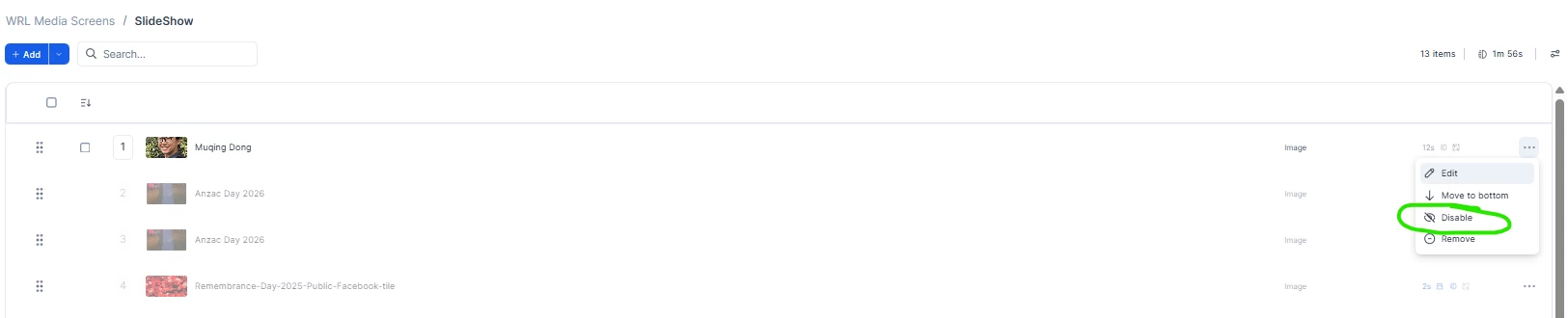
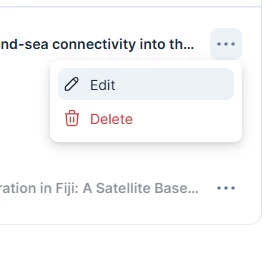
Above you see no disable option unlike below with slideshow we have the ability to disable.

We used to be able to do that with the tickers