
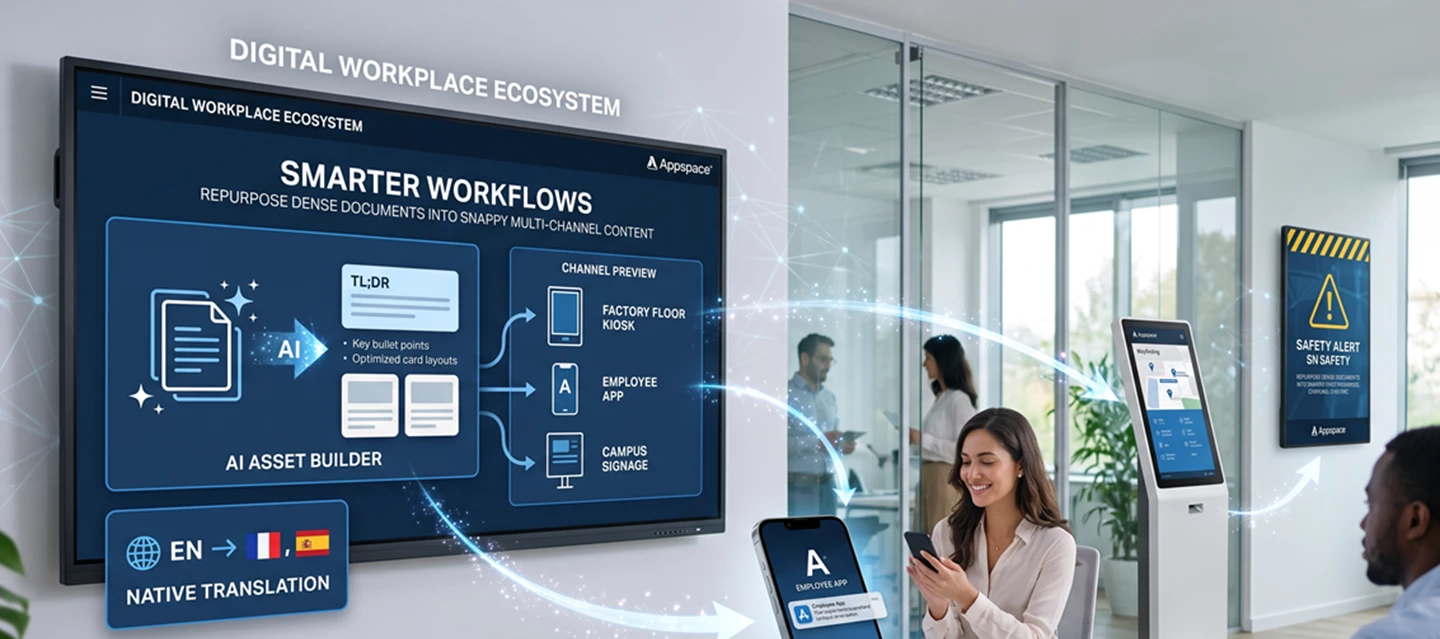




AI is top-of-mind for every workplace experience leader right now, but there is a major difference between AI hype and AI that actually does real work.
If you're a corporate communicator, HR manager, or IT administrator, you know the drill. You receive a lengthy policy update or a detailed initiative brief and need to get the message out quickly. Historically, that meant hours of manual copywriting, formatting, and creating different layouts for digital signage, desktops, and mobile devices.
With native, workplace-aware Appspace Intelligence, teams are transforming that workflow. Instead of jumping between external AI tools and manually copying content back into Appspace, they can use built-in AI capabilities to turn dense documentation into engaging, multichannel communications without ever leaving the platform.
Here are three ways customers are using Appspace AI to save time, simplify content creation, and reach employees more effectively.
The Workflow: From PDF Exhaustion to Omnichannel Success
Instead of treating AI like an external tool where you copy and paste content between applications, Appspace users are leveraging native AI inside the Card Editor and Sharebox to build, summarize, and format workplace communications in one place.
Here are three unexpected ways customers are using these capabilities today.
1. The Frontline Safety TL;DR
The challenge: A manufacturing team needs to distill a lengthy equipment compliance brief into something actionable for frontline workers who do not sit at desks.
The AI solution: Using the Appspace Card Editor's generative text and image tools, the team can pull out the most critical safety rules, generate a relevant workplace visual, and format the message into a high-visibility digital signage loop for the factory floor.
2. The Intranet-to-Signage Bridge
The challenge: HR and internal communications teams often create detailed articles for the Employee Intranet, but hybrid employees visiting the office may miss them if they are not actively checking their laptops.
The AI solution: Using Sharebox Generative AI, teams can turn long-form intranet posts into short, punchy summaries, suggested captions, and reusable messaging for digital signage, mobile notifications, or other employee communication channels.
3. Instantly Localized Campaigns
The challenge: Global communications often need to be translated and adapted for multiple locations, which can take days of coordination.
The AI solution: Teams can use Appspace AI Translation with location and device settings to create multilingual cards faster and deliver the right language based on where a screen or user is located.
Prompt Ideas to Copy and Paste
Ready to try it yourself? Start with a Quick Action, create a card, or open Sharebox and test one of these prompt frameworks.
For Safety and Compliance Signage
"Create a safety reminder card about forklift operations in the warehouse. Focus on the speed limit rule. Style: Minimalistic. Theme: Branded. Layout: Split screen with text and media."
For Hybrid Event Signage
"Announce the Summer Town Hall on Friday at noon in the main courtyard. Make it feel casual with summer vibes, tailored specifically for hybrid employees returning to the office today."
For Post Summarization in Sharebox
"Summarize the attached corporate sustainability policy into three bullet points under 15 words each. Add an engaging call to action for the Employee App."
The Metrics: What Time-Saving Actually Looks Like
Teams that track their content pipelines before and after using AI often find that the biggest benefit is not just faster content creation. It is the ability to adapt one message across multiple channels with less manual effort.
| What You Need | Old Way | New Way with Appspace AI | Typical Time Saved |
|---|---|---|---|
| Announcement graphic | 45 minutes for design and layout | 2-5 minutes to generate a card | About 40 minutes |
| Multi-language versioning | 2-3 days with agency routing | Minutes with AI Translation | Hours or days saved |
| Long-form text summary | 15-20 minutes of copywriting | About 1 minute with Sharebox AI | About 15 minutes |
| Custom graphic or photo search | 20 minutes searching stock sites | About 2 minutes to generate an image | About 18 minutes |
Actual time savings will vary based on your content, review process, and publishing workflow, but Appspace AI can help reduce the time spent creating, summarizing, translating, and adapting workplace communications.
How Are You Using It?
The creative options are wide open. You can generate first drafts, shorten long-form content, translate important updates, create supporting visuals, or adapt one message for multiple employee channels.
What is the most unique or unexpected prompt you've used with Appspace AI so far? Have you used Insights Assistant to see which AI-generated cards are getting the most attention?
Share your favorite prompts, creative workflows, or productivity tips in the comments so other community members can try them too.