Introduce Yourself!

  • August 15, 2025
  • May 21, 2026 at 9:29 PM
  • 64 replies
  • 3704 views

Show first post

64 replies

lordtrackball
Explorer
Forum|alt.badge.img+4

Hi everyone,

My name is Andrew, and I am an AV/IT Engineer with an investment firm who’s actual job is bench-testing technology before it is deployed to the production level in our organization.
However, my first task was to research and design our signage strategy during an office refresh and I’ve since become our org’s SME on signage. This grants me the fun of maintaining the product, facilitating user trainings, and whatever else comes up.  
By Summer 2026 we’ll have almost 200 devices live across 3 continents with 3 more locations coming online in the next undisclosed amount of time.

I’ve been working with Appspace for almost 2 years, with about 5 more years experience with Brightsign hardware and networking. We met with about 30 signage vendors, and demo’d about 12 before deciding on this platform.
I have spent a lot of time deep in Appspace and I am very comfortable with it- digging into weird nooks and crannies that make our rep upset. Engineer Dave joked that I should work at Appspace.

I’m very pro-community and I’m excited to see how we can all help each other out. Appspace does not seem to hang out on Reddit, and the digitalsignage subreddit’s Appspace contingent is basically only me at this point.

I’m hopeful that we can all lift each other up.


Forum|alt.badge.img

Hello!  My name is Joseph Vincent.  I am the corporate administrator for AppSpace for a medium chemical manufacturer. I do a lot of everything SHE and Digital.

We’ve used AppSpace in a limited number of locations since it was Marlin. Probably more than ten years now. I have experience with content creation and translating web site content for use with our AppSpace units.

I hope to learn about better ways to curate and maintain content, to hopefully expand the use of AppSpace at other sites throughout our company, and get good ideas for AppSpace usage.


Forum|alt.badge.img

Hello All! 🤗

I am Natassja, a new member on our P&C Team here at Appspace.

I will be supporting our Americas region as a People & Culture Partner, so I will work closely with our People Leaders and Team Members to ensure you have the tools you need to be successful. I am looking forward to meeting everyone and understanding how I can help support success here. 

By joining this community, I look forward to meeting new people, engaging with our tools, and exploring what Appspace has to offer first-hand. This is a great community to gain understanding from new perspectives and gain insight into how everyone supports our shared goals. I also love how this reminds us that we are all human behind these screens, and allows us to engage on a deeper level. 

I am very much looking forward to meeting everyone, and if you’d ever like to collab, please let me know! 


clouzeiro
Explorer
Forum|alt.badge.img

Hi, I'm Chelsey Louzeiro, Senior Internal Communications Manager at Heifer International, where I steward global internal communications and help shape how we connect employees through strategic storytelling, change communications, digital workplaces, and collaboration. I'm passionate about creating engaging employee experiences and building communication approaches that strengthen connections across a global organization.

I'm new to Appspace and looking forward to learning from others who are further along in their journey. As Heifer prepares to migrate our intranet from Igloo Software to Appspace, I'm excited to learn best practices for creating engaging experiences, governance, content strategy, and adoption that help employees easily find information and feel connected to our mission.


Bradley Rooke
Employee
Forum|alt.badge.img+3
  • Senior Customer Advocacy Manager
  • July 13, 2026

Hi, I'm Chelsey Louzeiro, Senior Internal Communications Manager at Heifer International, where I steward global internal communications and help shape how we connect employees through strategic storytelling, change communications, digital workplaces, and collaboration. I'm passionate about creating engaging employee experiences and building communication approaches that strengthen connections across a global organization.

I'm new to Appspace and looking forward to learning from others who are further along in their journey. As Heifer prepares to migrate our intranet from Igloo Software to Appspace, I'm excited to learn best practices for creating engaging experiences, governance, content strategy, and adoption that help employees easily find information and feel connected to our mission.

Welcome Chelsey! So pleased to see you here and can’t wait to see the next evolution of your intranet! Let’s build amazing things!


Forum|alt.badge.img+1
  • Explorer
  • August 28, 2026

My name is Barbara Hahn. I help prepare my company’s signage for arriving customers into our lobby. I’ve been using Appspace for at least a year now.  I just signed on yesterday and discovered the software has been updated and seemingly different from what I have used in the past.  I have customers coming in on Monday and I’ve been trying to figure out how to post their logo on our display screen.  I’m at an impasse trying to find the best (and fastest) way to accomplish what I need to get my assignment done by Monday.

Any suggestions? 


Dawn Wayland
Employee
Forum|alt.badge.img+8
  • Author
  • Community Manager
  • August 28, 2026

​@bhahn I completely understand wanting to get this updated quickly, especially with customers arriving on Monday. With the recent changes to the signage experience, some of the steps may look different from what you’re used to.

For a simple lobby welcome screen, the fastest approach would be to create a Banner Card and add it directly to your signage content.

  1. Go to Content in the Appspace console.

  2. Create a new Banner Card.

  3. In the Edit tab, upload the customer’s logo and add a short welcome message if desired.

  4. Choose a layout that places the logo alongside the text.

  5. Save the card and add it to the Channel playing on your lobby display.

For the layout, I’d recommend keeping it simple:

Welcome [Company Name]
[Customer Logo]

A clean background with the welcome message on the left and the customer logo on the right usually works well for lobby signage and keeps everything easy to read.

For the clearest results, use a high-quality PNG or SVG version of the logo.


Heather Redfield
Employee
Forum|alt.badge.img+2

Hi ​@bhahn, you can select Library > + Create > Upload Media and upload their logo as one option. You can also check out our Communication templates for some other options if you’re looking to also include text or image.

Please don’t hesitate to reach out if you need any additional clarification or if any other questions come up!


Forum|alt.badge.img
  • Explorer
  • September 1, 2026

Hello ALL, I am Daphne and I am the Sr. Admin Assistant here at the McLane in Ocala.  I have been working with APPSPACE for some time now and loving it.  Prior to APPSPACE it was McVision and that was different but interesting.  I look forward to learning from you all, and if anything, happy to help if I can.


Dawn Wayland
Employee
Forum|alt.badge.img+8
  • Author
  • Community Manager
  • September 1, 2026

​Welcome to the Community, ​@MsDap! 👋 So glad to hear you’ve been enjoying Appspace. We’re happy to have you here and really appreciate you already offering to share your experience and help others. Looking forward to seeing you around the Community! 😊


Forum|alt.badge.img+1
  • Explorer
  • September 2, 2026

Thank you for all your suggestions however, I’ve got a card/template already created with our personal background and logo with the title WELCOME on it.  It is under the WELCOME text that I want to place our customer’s logo.  Any suggestions? 

I’ve been on the tutorials, troubleshooting on my own.  I’m at an impasse and don’t want to wait until the last minute when we get another customer to try and figure it all out. 

I need to be able to manipulate the customer logo making sure it’s the right size and centered.  This is what I was able to do on the previous version of Appspace. Any suggestions would be greatly appreciated.


Thank you!


Heather Redfield
Employee
Forum|alt.badge.img+2

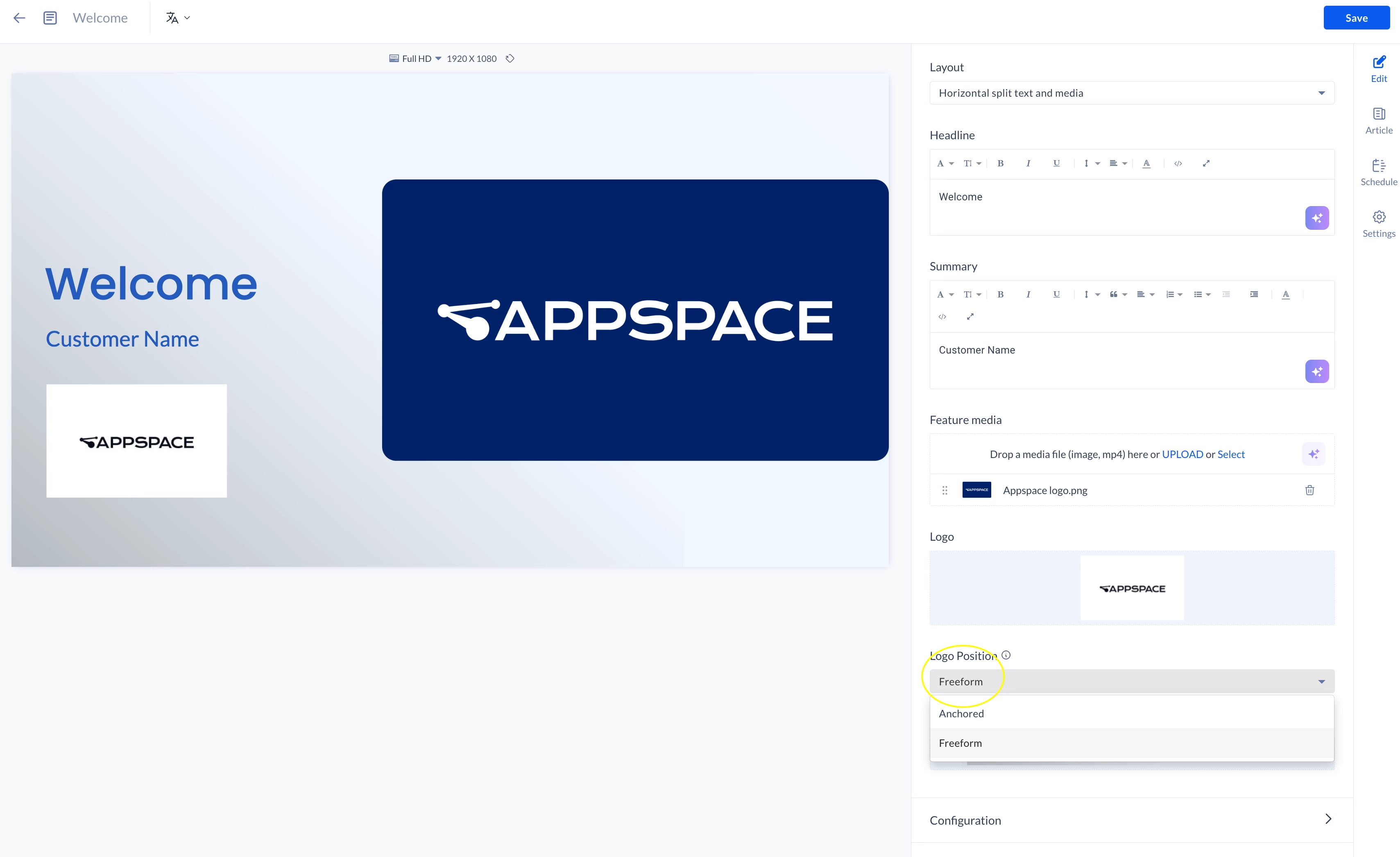
Hi ​@bhahn, if your personal background already includes your logo, you could upload the customer’s logo and select Freeform for the Logo Position instead of Anchored. This would allow you to move their logo to the desired location and adjust its size. I included an example below!


Forum|alt.badge.img+1
  • Explorer
  • September 3, 2026

Thank you  ​@Heather Redfield.  However, I’m looking at your screen and on the top right you have “edit”, but on my screen I have”preview”.  How do I view the “edit” icon?  

Thank you for your continued support.


Heather Redfield
Employee
Forum|alt.badge.img+2

​@bhahn, I’m happy to help! Is this content that you uploaded? If so, unfortunately, there isn’t a way to edit it. However, if you use one of our ready-to-use card templates, like the one I used in my example, you should see an Edit icon that allows you to make changes.

As a friendly reminder, you can navigate to the Menu on the left-hand side of your screen > select Library > select +Create > select Communication, and then choose from any of the available templates. You can populate the card with your company messaging and logo from here.