
Navigating Appspace Release Numbers: What They Mean and How to Find Yours
Beginning in 2026, Appspace moved to a new version numbering system. This guide explains what release numbers mean, how to find yours, and how updates are delivered depending on your deployment.
How to Read a Release Number
Appspace release numbers follow this format:
YYQQ.F.M
| Segment | What it means | Example |
|---|---|---|
| YY | Year | 26 = 2026 |
| Quarter | 01 = Q1 | |
| F | Feature Release number | 0, 1, 2… |
| M | Maintenance Release number | 0, 1, 12… |
Example: 2601.0.0 means the first major release of Q1 2026. 2601.1.12 means the 12th maintenance update to the first feature release of that same quarter.
A few things worth knowing:
- The number reflects the beginning of the quarter it belongs to, not the end.
- The first Taurus release, 2601.0.0, was deployed to the public cloud in Q1 2026.
- Numbers will continue to climb throughout the quarter as new feature and maintenance releases go out.
The Three Types of Releases
Major releases (F = 0)
These are the big quarterly drops — e.g. 2601.0.0. They introduce significant new features and platform improvements and are released on a quarterly cycle, typically on a Friday at 8:00 PM CST.
Feature releases (F = 1, 2, 3…)
These are scheduled mid-quarter updates — e.g. 2601.1.x, 2601.2.x, 2601.3.x. They bring new functionality and enhancements and are also typically released on Tuesdays or Fridays at 8:00 PM CST.
Maintenance releases (M = 1, 2, 3…)
These are smaller updates focused on bug fixes, stability improvements, and security patches — e.g. 2601.1.12. They can be released at any time as needed, including outside of the regular schedule for critical fixes.
Public Cloud vs. Private Cloud Release Cycles
How and when you receive updates depends on your deployment type.
Public Cloud
Public Cloud customers receive updates through two environments:
- Preview — An early access environment where upcoming releases are available before they go to general production. Preview releases are labeled as such in the release notes (e.g. 2601.4.0 Taurus (Preview)). This allows customers and partners to explore new features ahead of the full rollout.
- Production — The stable, fully released version available to all public cloud customers.
Private Cloud
Private Cloud customers have three environments:
- Sandbox — An isolated testing environment for validating updates before they are applied to your live environment.
- Weekly — A more frequent update cadence, delivering the latest fixes and improvements on a weekly basis.
- Monthly — A consolidated release delivered once a month, bundling updates for customers who prefer a less frequent cadence.
Private Cloud Release Calendar
Not sure which release cycle you're on? Reach out to your Customer Success Manager (CSM) — they can confirm your current environment and cadence.
How to Find Your Current Version
You can check your current version directly in the Appspace Admin Console:
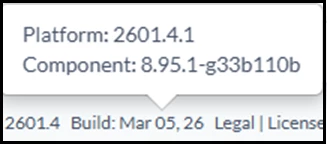
- Scroll to the bottom of any page in the Admin Console.
- You'll see your feature release number — for example, 2601.4.
- Hover over the build date to reveal the full version detail, including your maintenance release — for example, Platform: 2601.4.1.
This tells you exactly where you are within the current release cycle.
Other Release Tracks
The YYQQ.F.M numbering applies specifically to the core Appspace platform — whether you're on public or private cloud. However, Appspace also maintains separate versioning for other components:
- Devices & Built-In Apps — Updates to the Appspace app on dedicated devices (e.g. BrightSign, Android, Chrome OS, Cisco, Crestron)
- Cards — Standalone content card updates (e.g. AI Generate Card, YouTube Card)
- Mobile — Updates to the Appspace mobile app
- Account Management Portal (AMP) — Releases specific to account administration
- On-Prem — Updates for on-premises deployments
- SharePoint Intranet — Releases for the SharePoint Intranet (formerly Beezy)
Each of these has its own release notes and versioning. You can filter by release type on the Product Updates page to find what's relevant to you.
Stay Up to Date
Bookmark these resources to track what's coming and what's been released: