



When the provider event is synced to Appspace, an event within Appspace might be set as conflict/canceled due to conflict. This may be caused by one of the reasons below:
- Conflict with existing events in Appspace
- Constraint violation
- Google Calendar (GCAL) room only: Room event declined from GCAL room
If the event is canceled due to conflict, unfortunately our current product design is unable to show the conflict reason from the user interface (UI); for example:
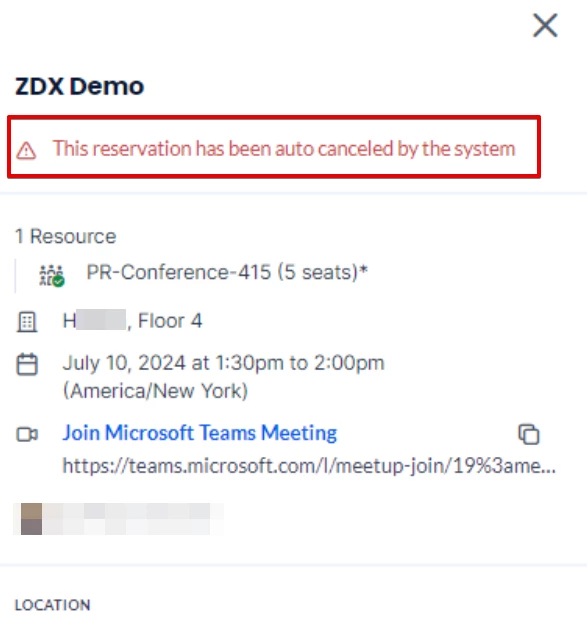
Troubleshooting Steps
Steps to manually check the conflict/cancellation reason:
- Log into the Appspace admin console.
- Navigate to the reservations module.
- Open your browser developer tools and select the network tab (select F12).
- Select the event.
- There should be a GET API in the network tab similar to: e53472b6-9d04-4ce9-9dfe-fb53f826598b?includesourceobject=true.
- Select this value, and select the preview tab.
- Search for the reservableResults value.
We can determine what the reason is that the event is in conflict based on the data from reservableResults:
- If constraintValidationResult is visible, the reservation is in violation of a constraint rule.
- If events is visible, the reservation is conflicting with (an) existing event(s) in Appspace in terms of event time.
- If unavailableReason is visible and includes ProviderResourceDecline, this tells us that the GCAL room declined the event in GCAL.
The room declined the event in GCAL (This is GCAL only)
When the room declines the event in GCAL, we sync the provider event, and we know that the room is declined. In this case, when syncing to Appspace space reservation, we will either set the event status as conflict/canceled based on the provider reservations with conflicts setting within the admin console > reservations > settings.
In this case, the user is not able to view the reason for the conflict/cancellation, as this is not currently supported by the Appspace console user interface (UI).