

Verify Employees Have Read Critical Communications: A Guide to Content Acknowledgment for Pages and Stories
With the new Read and Acknowledge feature for Pages and Stories, Account Owners and Publishers can require their audience to formally acknowledge they have read and understood content in the Appspace Intranet. This provides a reliable, real-time confirmation and a clear audit trail, helping organizations close the gap between “published” and “confirmed.”
Key Benefits
- Verified Compliance — Move beyond view counts to know exactly who has read your critical communications, from policy updates to safety procedures
- Clear Accountability Trail — Every acknowledgment is recorded, providing a reliable audit trail for compliance and reporting purposes
- Simple Experience for Employees — Employees are guided through a clear acknowledgment flow: a notification, a brief prompt, and a single confirmation step after reading the content
- Real-Time Status Tracking — Monitor who has confirmed and who has not yet acknowledged, making it easy to follow up and ensure full coverage
What This Guide Covers
This guide focuses on the following:
- How Read and Acknowledge works for Account Owners and Publishers who enable it and for employees who receive it
- How to track acknowledgment progress using the content acknowledgment dialog and Details panel
- Three use cases where Read and Acknowledge adds the most value: policy updates, safety procedures, and mandatory training
For step-by-step configuration instructions, including how to enable Read and Acknowledge on your content, see the Getting Started section at the end of this guide.
Prerequisites
Before using the Read and Acknowledge feature, ensure you meet the following requirements:
- User Role — You must have an Account Owner or Publisher role to enable Read and Confirm on content
- User License — A Premium license is required for Account Owners and Publishers to create and edit Pages and Stories on the Intranet, and for end users to view and acknowledge them
- Content Type — Read and Acknowledge is available for Pages and Stories only. It is not supported on User Posts, Event Posts, Polls, Praises, or Questions
How It Works: The Account Owner/Publisher and Employee Experience
Read and Acknowledge adds a formal acknowledgment step to Pages and Stories. Here is what the experience looks like from both sides of the workflow.
The Account Owner/Publisher Experience
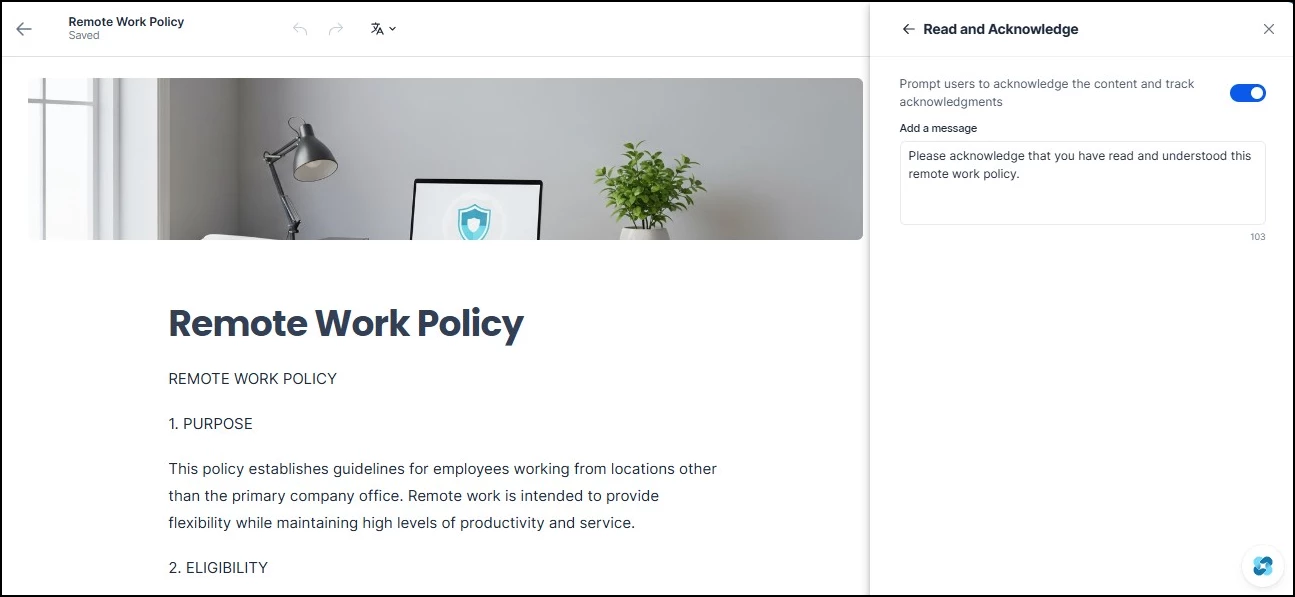
The Read and Acknowledge option lives inside the configuration settings of the Pages and Stories editor. Account Owners and Publishers enable it while creating or editing content, just like any other publishing setting. Once turned on, the feature applies to anyone following the community, topic, or channel where the content is published, and each of them will need to formally confirm they have read the content.
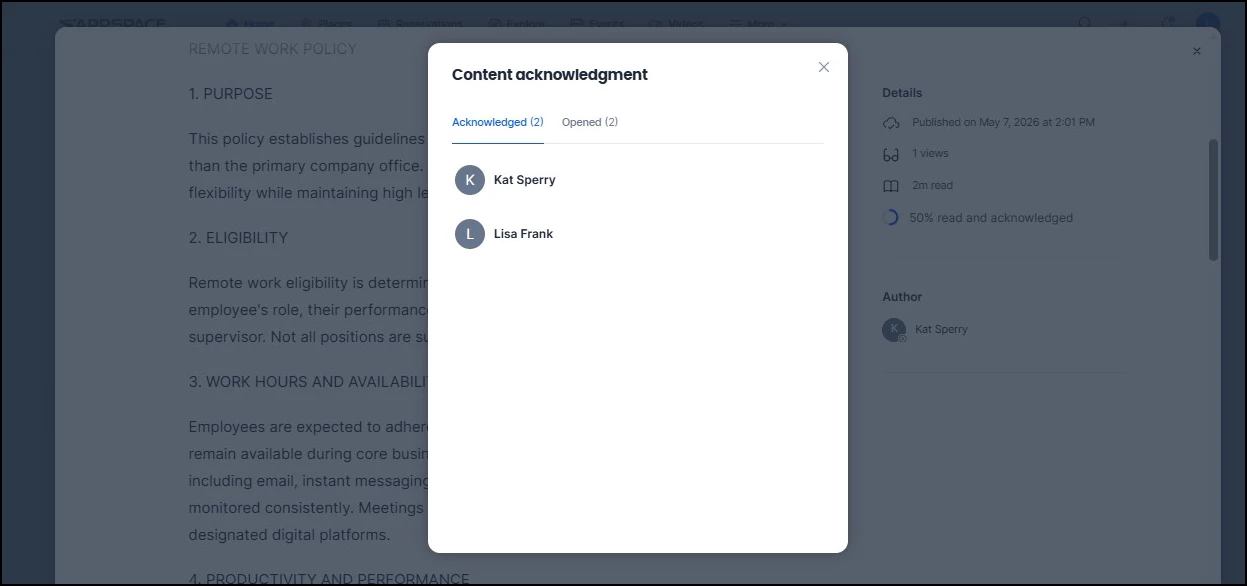
After publishing, the content's Details panel displays a “read and acknowledged” percentage alongside standard metrics like views and estimated read time. For a more detailed breakdown, the Content acknowledgment dialog splits your audience into two tabs: Acknowledged (users who have confirmed) and Opened (users who have opened the content but have not yet completed the acknowledgment). This makes it easy to identify who still needs to take action and follow up accordingly.
The Employee Experience
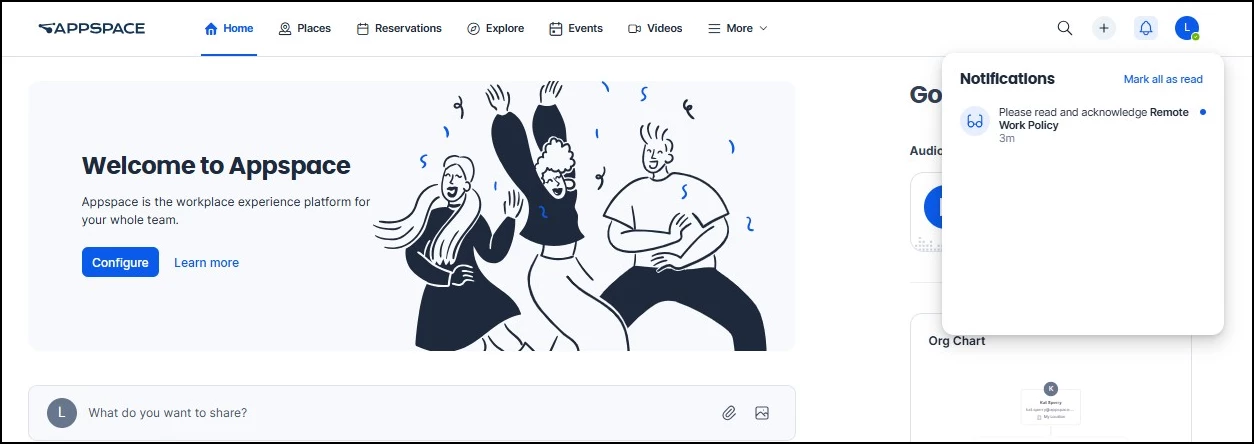
When a Page or Story with Read and Acknowledge is published, targeted employees receive a notification on the Intranet identifying the content by name (for example, “Please read and acknowledge Remote Work Policy”).
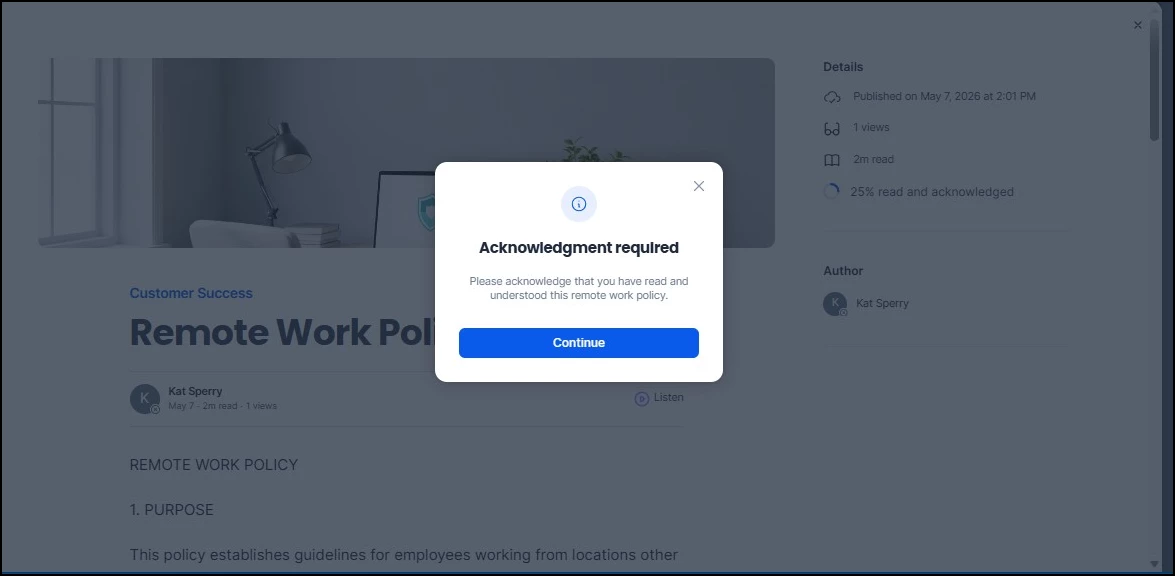
When the employee opens the content, an Acknowledgment required dialog appears first, with a Continue button to proceed to the full article.
After reading, a persistent banner at the bottom of the screen prompts them to click Acknowledge and continue to formally confirm. Employees must scroll through the content before this button becomes active, ensuring the material is actually reviewed rather than just opened.
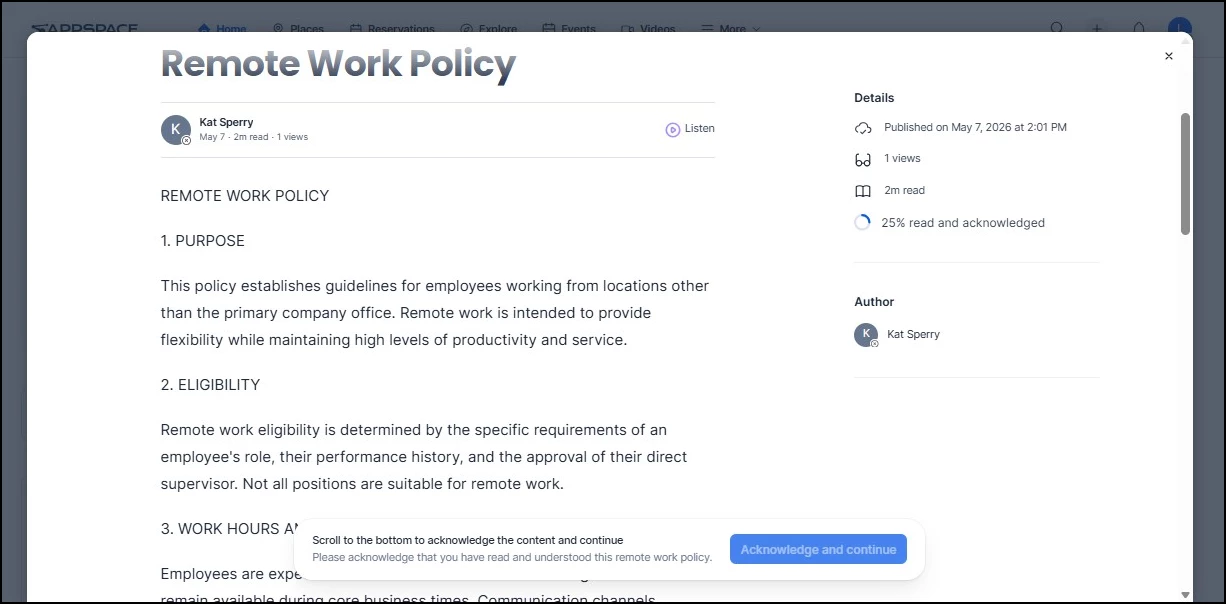
Once confirmed, an “Acknowledgment sent!” toast appears and the content displays normally going forward.
When to Use Read and Acknowledge
Not every piece of content needs a formal acknowledgment step. Read and Acknowledge is designed for communications where passive view tracking is not enough and you need verified proof that employees have read and understood the material. Below are three common use cases.
Policy Updates and Legal Communications
When your organization updates policies, you need confirmation that your employees have acknowledged it. Read and Acknowledge gives you a confirmed record that each employee has formally acknowledged the new policy, which can be critical if compliance questions arise later.
Example: Your HR team publishes an updated remote work policy that changes eligibility criteria and reimbursement terms. By enabling Read and Acknowledge, they can verify that every employee in the relevant community has acknowledged the new terms. When an employee later submits a reimbursement request under the old policy, HR can reference the acknowledgment record to confirm the employee was informed of the change.
Safety Procedures and Compliance Requirements
For organizations in heavily regulated industries (healthcare, manufacturing, finance), safety procedures and compliance communications often require documented proof that employees have been informed. Read and Acknowledge provides the audit trail these requirements demand.
Example: A facilities team publishes updated emergency evacuation procedures after a building renovation changes exit routes. With Read and Acknowledge enabled, they can check the Acknowledged tab to see exactly which employees in that location's channel have confirmed. If a fire safety audit asks for proof of employee notification, the record is already there.
Mandatory Training and Certification Materials
When training materials are published as Pages or Stories, and completion must be verified, Read and Acknowledge ensures employees do not simply click through. The scroll-to-acknowledge design confirms that the material was actually reviewed, not just opened.
Example: An IT security team publishes an annual cybersecurity awareness briefing as a Page, covering phishing identification, password requirements, and incident reporting procedures. Enabling Read and Acknowledge on the Page ensures every targeted user scrolls through the full briefing and formally acknowledges it. The Opened tab makes it easy to identify anyone who clicked in but did not complete the acknowledgment, so IT can follow up before the compliance deadline.
Getting Started
To start using Read and Acknowledge on your Pages and Stories, follow the step-by-step instructions in the technical reference article: Content Acknowledgment for Pages and Stories.
Keep in mind the following as you get started:
- Choose your content carefully — Reserve Read and Acknowledge for communications that genuinely require verified acknowledgment. Overusing it can lead to acknowledgment fatigue among employees.
- Coordinate with stakeholders — Make sure the content is published to the right community, topic, or channel before enabling Read and Acknowledge. Acknowledgment tracking is most valuable when the right followers are included from the start.
- Monitor your tracking view — Check the reporting view regularly to follow up with users who are still pending acknowledgment and ensure your critical communications reach everyone.