



Maximize Your Message's Impact: Best Practices for Content Timing
Content timing should reflect how long viewers remain near a display, how much information each item contains, and how often a priority message needs to appear. Appspace playout properties provide the controls; the timing ranges in this guide are planning recommendations rather than fixed requirements.
Key Benefits
This article provides the following benefits:
- Improved comprehension: Give viewers enough time to understand each message.
- Appropriate repetition: Increase priority-message exposure without creating a repetitive channel.
- More relevant schedules: Use date ranges and dayparting to show content when it matters.
What This Guide Covers
This guide covers the following topics:
- Classifying viewing environments
- Estimating item and playlist duration
- Using a repeated-read test
- Configuring playout properties
- Testing the complete channel
Prerequisites
Before you begin, confirm the following requirements:
- Channel permissions: You need permission to edit the target Playlist Channel.
- Audience knowledge: Estimate viewing distance, dwell time, and arrival patterns.
- Representative device: Use a device and display similar to the production environment for testing.
Classify the Viewing Environment
Starting Timing Ranges
| Environment | Typical behavior | Starting range |
| Point of Transit | Viewers move past the display | About 5–10 seconds for a simple message |
| Point of Interval | Viewers wait or pause nearby | About 20–30 seconds for moderately detailed content |
| Point of Interaction | Viewers actively perform a task | Variable; match the task and interaction |
| Recommendation: These ranges are examples. A short alert may need less time, while a detailed card may need more. |
Estimate Playlist Length
Use Dwell Time as a Planning Input
Estimate the number of content slots available during the typical dwell period, then decide how often important messages should appear.
- Potential content slots: Dwell time divided by average item duration.
- Target playlist size: Potential slots divided by the desired number of opportunities to see a message.
Example: During a 15-minute dwell period, 20-second content provides about 45 slots. A target of four opportunities to see each message suggests a playlist of about 11 items.
| Not a guarantee: This method does not account for arrival point, varying item durations, feeds, skipped items, or viewer attention. Use it as an editorial estimate. |
Test Readability
Use a Repeated-Read Heuristic
Preview the item and read it aloud. As a practical test, the message should be readable several times within its display duration. The commonly cited “5x rule” can be used as a conservative heuristic, but it is not a system requirement.
- If the message is too dense: Reduce word count, split it into multiple items, or increase duration.
- If the message is too slow: Shorten duration or add a stronger visual progression.
- For calls to action: Leave enough time to scan a QR code or note the destination.
Configure Playout Properties
Set Timing and Frequency
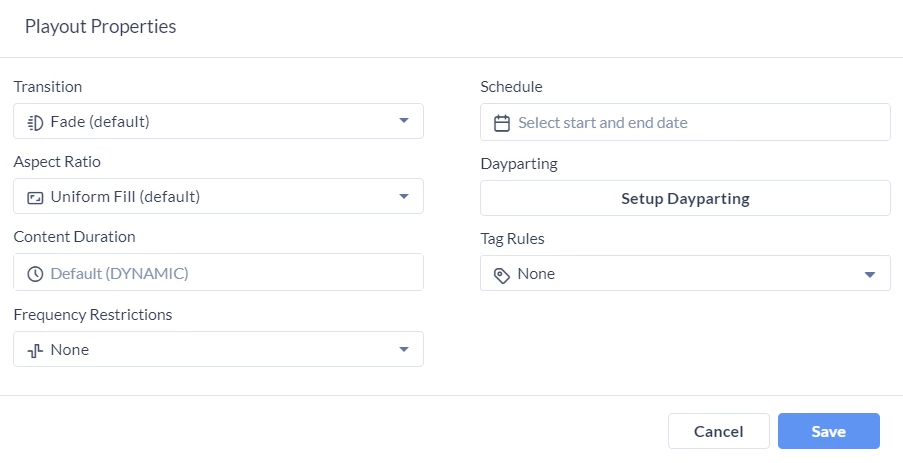
- Content duration: Define how long the item displays when the setting applies.
- Frequency restrictions: Use exact, maximum, loop-based, or airtime-percentage controls where available.
- Schedule: Set content start and end dates.
- Dayparting: Choose the days and time windows when content should play.
- Transition: Use a transition that does not consume too much of the reading time.
- Aspect ratio: Choose the fitting mode that avoids distortion or unintended cropping.
Validate the Full Channel
Production Test
1. Preview the full Playlist Channel.
2. Watch from the expected viewing distance.
3. Time at least one complete loop.
4. Check that high-priority items repeat appropriately.
5. Confirm date schedules and dayparting.
6. Test on representative hardware and adjust based on real viewing conditions.