

Conversational AI for Appspace Workspace: User Guide
Introduction
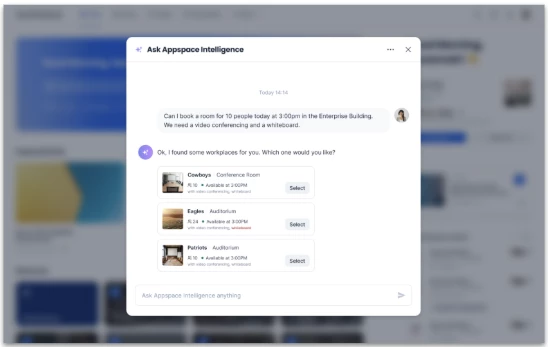
This guide provides information on configuring, setting up prerequisites for, and properly using Conversational AI for Appspace Workplace. This feature enables natural, chat-based interactions with integrated AI agents that simplify how users book, manage, and inquire about workspaces.
Key Benefits
Using Conversational AI for Appspace Workspace offers several benefits:
- AI Integration and Assistance: Creates easy-to-use, conversational interactions to improve the reservation experience for users.
- Efficient Booking: Enables users to request a room and book a resource through chat.
- Simple Check-in: Allows users to check into reservations with a basic prompt.
What This Guide Covers
This guide will cover the following topics:
- Enabling Conversational AI in Appspace
- Using the AI Search Agent
Prerequisites
To enable Conversational AI, you need to meet the following requirements:
- Platform license
- Location Admin or Account Owner role
To use the Search Agent, you need:
- Premium license
Enabling Conversational AI
To use Conversational AI features in Employee View, an Account Owner must first enable them in the Admin Console.
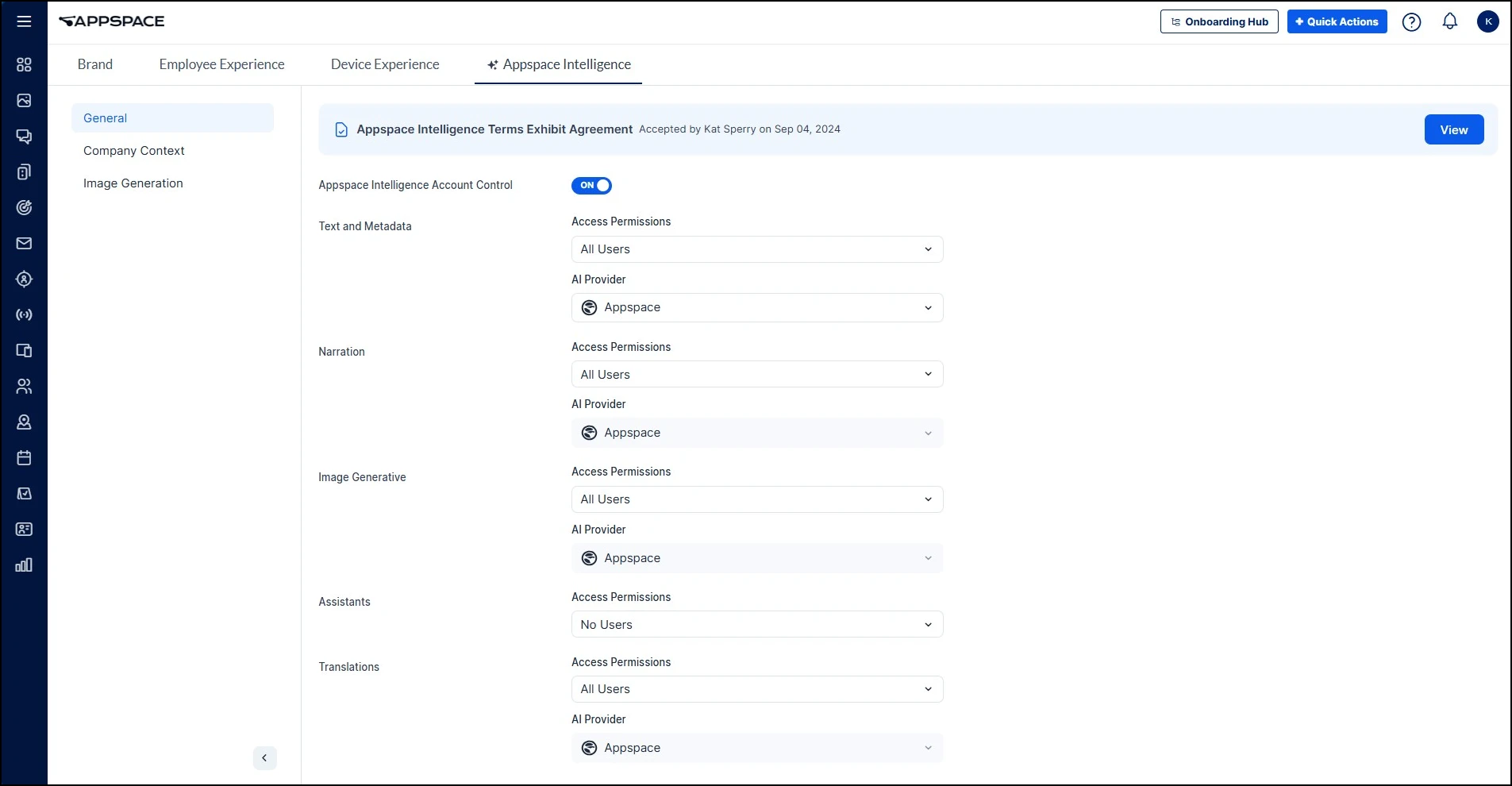
- Navigate to ☰ Appspace menu > Settings > Configuration > Appspace Intelligence.
- If this is your first time enabling Appspace Intelligence, review and accept the Appspace Intelligence Terms Exhibit Agreement.
- Toggle Appspace Intelligence Account Control to ON.
- Locate the Assistants category on the settings page.
- From the Access Permissions dropdown, select who can use Conversational AI:
- All Users
- Publishers and Account Owners Only
- Specific Users, Groups, or Locations
- From the AI Provider dropdown, select the provider that will power Conversational AI responses:
- Appspace (default)
- Azure
- Click Save.
Note: Each Appspace Intelligence feature category (Text and Metadata, Narration, Image Generative, Assistants, and Translations) has its own Access Permissions and AI Provider settings. Changes to the Assistants category do not affect the other categories.
Using the AI Search Agent
The Search Agent is a built-in Conversational AI assistant that helps employees manage workplace logistics through natural language. To access it, click the search bar in the upper-right corner of the Employee View homepage, then select Ask Appspace Intelligence something.
Booking and Reservations
- "Find me a meeting room on the third floor for four people tomorrow at 2 p.m."
- "Book a desk near the marketing team for Monday morning."
- "What conference rooms are available right now on the second floor?"
Reservation Management
- "Cancel my reservation for 3 p.m. today."
- "Show me my upcoming reservations for this week."
- "Move my 10 a.m. meeting to 11 a.m."
Workplace Information
- "What amenities does Conference Room B have?"
- "How many people can the Town Hall room hold?"